
You don’t need professional photography equipment to explore different wedding photo ideas. With tools such as Google Gemini and ChatGPT, you can experiment with backgrounds, wedding outfits, lighting and romantic poses using a reference photograph.
How to Create Wedding Couple Photos Using AI
Start with a clear photograph of you and your partner. Ideally, both faces should be visible, with natural lighting and minimal filters.
- Open Google Gemini, ChatGPT or another AI image tool that supports reference photos.
- Upload your chosen couple photograph.
- Select and copy one of the wedding photo prompts below.
- Customize the clothing, location and photography style if needed.
- Generate your image and review the result.
- Request specific adjustments until you are happy with the image.
Remember: AI tools may not preserve facial features perfectly. Always review the generated image before downloading, printing or sharing it.
AI Prompts for Beautiful Wedding Couple Photos
From traditional wedding portraits to modern editorial photography, these prompts offer different ways to explore your favorite wedding photo styles.
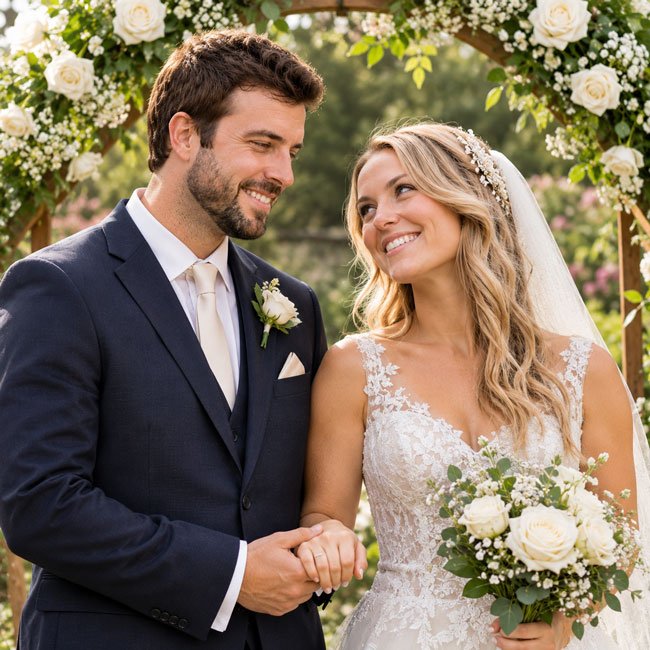
1. Romantic Garden Wedding Couple Photo
Copy the Prompt:
Create a realistic romantic wedding portrait using the uploaded couple photograph as the reference. Place the couple beneath an elegant floral wedding arch in a beautiful garden surrounded by white roses, soft greenery and delicate flowers. Dress them in elegant wedding attire while preserving their recognizable facial features, natural skin tones and hairstyles. Show the couple holding hands and smiling gently at each other. Use soft afternoon sunlight, realistic fabric textures, natural body proportions and a softly blurred background. Create a timeless wedding photography style with a vertical 4:5 composition.
Best for: Outdoor wedding portraits, wedding invitations, romantic Instagram posts and digital wedding albums.
Customization tip: Replace the white roses with lavender, peonies or your favorite wedding flowers.
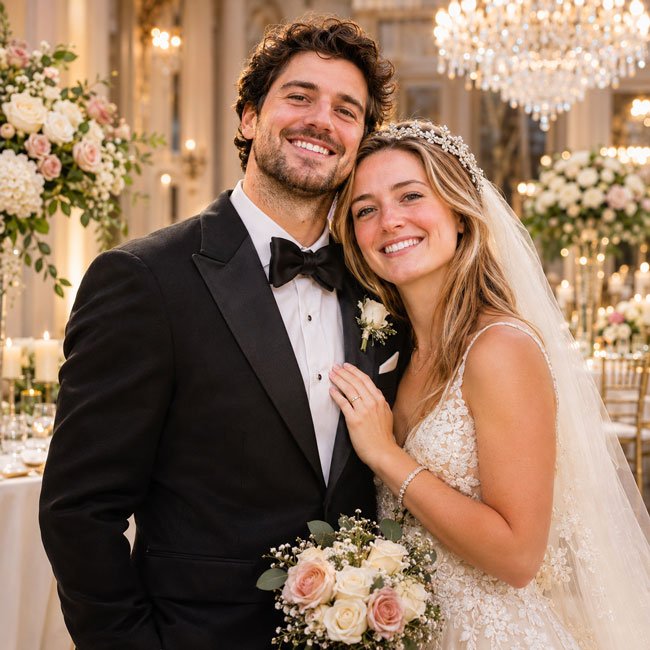
2. Luxury Ballroom Wedding Portrait
Copy the Prompt:
Transform the uploaded couple photograph into an elegant wedding portrait inside a luxurious ballroom decorated with crystal chandeliers, tall floral arrangements and warm ambient lighting. Dress the couple in refined formal wedding attire, with realistic fabric details and elegant accessories. Preserve their recognizable facial characteristics and natural expressions. Position them together in a graceful pose with relaxed body language. Use professional editorial wedding photography, balanced lighting, soft background bokeh and realistic skin texture. Create a sophisticated, romantic atmosphere without excessive digital effects. Use a vertical 4:5 portrait composition.
Best for: Luxury wedding albums, formal portraits, wedding announcements and framed photographs.
Customization tip: Specify champagne, ivory or emerald green decorations to match your wedding color palette.
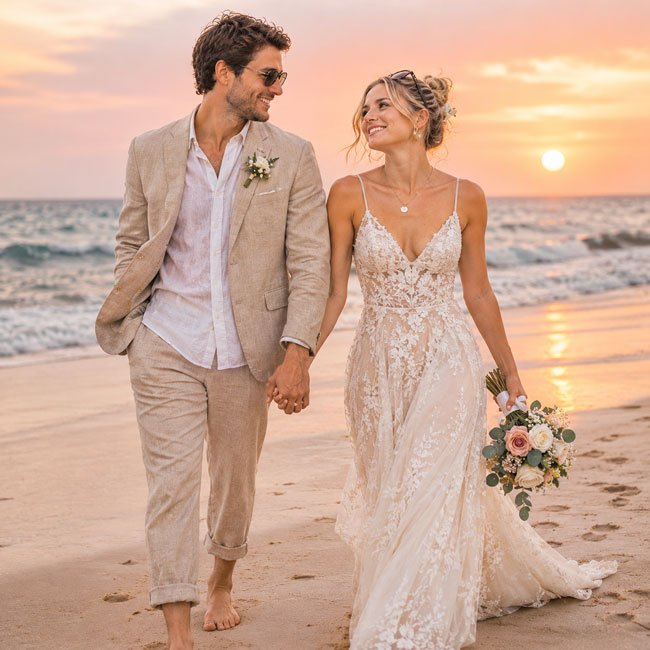
3. Dreamy Beach Wedding Couple Photo
Copy the Prompt:
Create a realistic destination wedding photograph using the uploaded couple image as the reference. Show the couple walking barefoot along a peaceful sandy beach during golden hour, with gentle ocean waves and a pastel sunset in the background. Dress them in lightweight, elegant wedding attire suitable for a beach ceremony. Maintain their recognizable facial features, natural skin tones and realistic body proportions. Capture a candid moment as they hold hands and smile at each other. Add a gentle ocean breeze, soft golden sunlight and natural shadows. Use professional lifestyle wedding photography with a vertical 4:5 composition.
Best for: Destination wedding inspiration, honeymoon memories, Instagram and Pinterest.
Customization tip: Try a Hawaiian beach, the California coastline or a Mediterranean seaside setting.
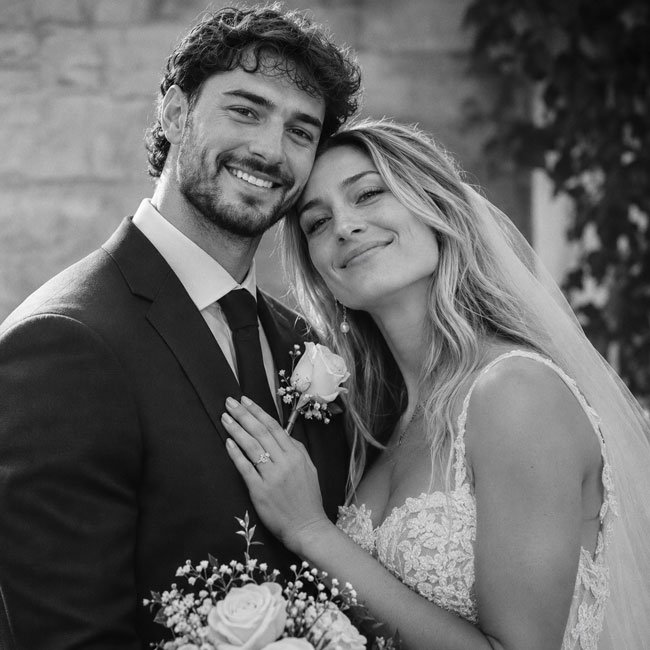
4. Classic Black and White Wedding Portrait
Copy the Prompt:
Create a timeless black and white wedding portrait using the uploaded couple photograph as the identity reference. Show the couple standing close together in a simple, elegant setting with natural affectionate expressions. Preserve their recognizable facial characteristics, hairstyles and realistic body proportions. Use soft directional lighting, balanced monochrome contrast, detailed fabric textures and subtle film grain. Capture the emotional connection between the couple rather than focusing on elaborate decorations. The final image should resemble authentic fine-art wedding photography with a refined and intimate atmosphere. Use a vertical portrait composition.
Best for: Fine-art wedding portraits, printed photographs, wedding albums and timeless keepsakes.
Customization tip: Request softer contrast for a gentle vintage appearance or stronger contrast for a dramatic editorial look.
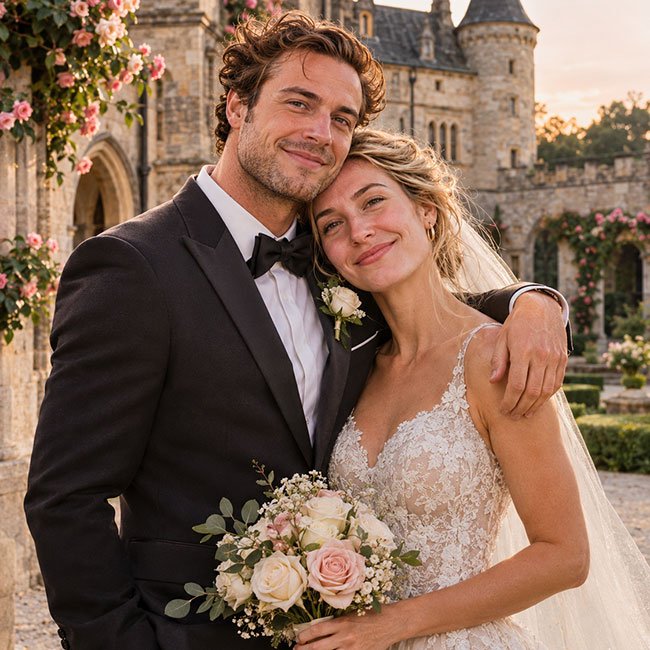
5. Fairytale Castle Wedding Couple Photo
Copy the Prompt:
Create a romantic fairytale wedding portrait using the uploaded couple photograph as the reference. Place the couple in the courtyard of a beautiful historic European castle surrounded by elegant stone architecture, climbing roses and landscaped gardens. Dress them in sophisticated wedding attire with realistic fabric textures and natural details. Keep their facial features recognizable and their expressions relaxed. Use soft golden-hour lighting, subtle atmospheric depth and realistic architectural details. The photograph should feel romantic and cinematic while remaining believable and natural. Create a vertical 4:5 composition with the couple as the main focus.
Best for: Fairytale wedding inspiration, destination wedding concepts, Pinterest and romantic photo collections.
Customization tip: Change the setting to a French château, Scottish castle or historic English country estate.
6. Rustic Countryside Wedding Portrait
Copy the Prompt:
Using the uploaded couple photograph as a reference, create a realistic rustic wedding portrait in a peaceful countryside setting. Place the couple outside a beautifully decorated wooden barn surrounded by wildflowers, greenery and warm string lights. Dress them in elegant but relaxed wedding attire that complements the natural environment. Preserve their recognizable facial features and authentic expressions. Show them walking together or sharing a quiet affectionate moment. Use warm evening sunlight, earthy colors, realistic textures and natural lifestyle wedding photography. Create a cozy, welcoming atmosphere with a vertical 4:5 composition.
Best for: Barn weddings, countryside wedding inspiration, outdoor portraits and wedding mood boards.
Customization tip: Add sunflowers, eucalyptus, wooden decorations or autumn foliage for a seasonal touch.
7. Cinematic Wedding First Dance Photo
Copy the Prompt:
Create a realistic cinematic wedding photograph using the uploaded couple image as the reference. Show the couple sharing their first dance on an elegant reception dance floor surrounded by softly glowing fairy lights and subtle floral decorations. Preserve their recognizable facial features, natural skin tones and realistic body proportions. Capture a relaxed romantic dance pose with natural hand placement and affectionate expressions. Use warm directional lighting, soft background bokeh and gentle movement in the wedding clothing. The image should feel like an intimate candid moment captured by a professional wedding photographer. Use a vertical 4:5 composition.
Best for: Wedding reception memories, romantic social media posts and wedding album covers.
Customization tip: Request a wider composition if you want to include more of the reception venue.
8. Vintage Film Wedding Couple Photo
Copy the Prompt:
Transform the uploaded couple photograph into a nostalgic vintage wedding portrait inspired by classic 35mm film photography. Place the couple in a timeless wedding setting with understated floral decorations and elegant traditional wedding clothing. Maintain their recognizable facial features, natural expressions and realistic skin texture. Use muted warm colors, subtle film grain, gentle highlights and soft natural lighting. Capture an affectionate candid moment with believable body language. Avoid excessive sepia effects, artificial skin smoothing and exaggerated vintage filters. Create an authentic family-album aesthetic with a vertical portrait composition.
Best for: Retro wedding inspiration, nostalgic keepsakes, wedding albums and vintage-style Instagram posts.
Customization tip: Add a specific decade, such as the 1970s or 1990s, to influence the clothing and photography style.
9. Mountain Wedding Couple Portrait
Copy the Prompt:
Create a realistic outdoor wedding portrait using the uploaded couple photograph as the reference. Place the couple on a safe scenic overlook surrounded by majestic mountains, evergreen trees and a peaceful natural landscape. Dress them in elegant wedding attire suitable for an outdoor ceremony. Preserve their recognizable facial characteristics, hairstyles and natural skin tones. Show them standing close together with relaxed, affectionate expressions. Use soft mountain sunlight, realistic landscape details, natural shadows and professional adventure wedding photography. Balance the couple and the surrounding scenery in a beautiful vertical 4:5 composition.
Best for: Adventure weddings, elopement inspiration, destination wedding portraits and nature-loving couples.
Customization tip: Try scenery inspired by the Canadian Rockies, Colorado mountains or the Swiss Alps.
10. Modern City Wedding Editorial Photo
Copy the Prompt:
Create a stylish editorial wedding photograph using the uploaded couple image as the reference. Show the couple walking together along an elegant city street surrounded by classic architecture and softly blurred urban details. Dress them in modern, sophisticated wedding attire with realistic fabric textures. Maintain their recognizable facial features, natural skin tones and authentic expressions. Capture a relaxed candid walking pose with natural movement and realistic proportions. Use soft daylight, refined neutral colors and professional fashion-inspired wedding photography. The final image should feel contemporary, romantic and effortless. Use a vertical 4:5 composition.
Best for: Modern wedding announcements, courthouse wedding inspiration, editorial portraits and Instagram.
Customization tip: Try a setting inspired by New York, London, Paris or downtown Toronto.
Which Wedding AI Prompt Should You Choose?
The right prompt depends on your personal style and how you plan to use the finished photograph. Use this quick comparison to find a suitable starting point.
| Wedding Photo Style | Best Suited For | Mood |
|---|---|---|
| Garden Wedding | Outdoor ceremonies | Soft and romantic |
| Luxury Ballroom | Formal wedding portraits | Elegant and refined |
| Beach Wedding | Destination weddings | Relaxed and dreamy |
| Black and White | Timeless keepsakes | Classic and emotional |
| Fairytale Castle | Storybook wedding inspiration | Romantic and dramatic |
| Rustic Countryside | Barn and outdoor weddings | Warm and natural |
| First Dance | Reception portraits | Intimate and cinematic |
| Vintage Film | Retro wedding albums | Nostalgic |
| Mountain Wedding | Adventure weddings | Scenic and peaceful |
| Modern City | Contemporary weddings | Stylish and sophisticated |
How to Customize AI Wedding Photo Prompts
You don’t have to use every prompt exactly as written. Changing a few details can help you create a wedding portrait that better reflects your personality, cultural traditions and preferred photography style.
1. Choose Your Wedding Attire
Replace the clothing description with your preferred wedding outfits. You can request a traditional white wedding dress, tailored tuxedo, minimalist bridal gown, vintage wedding attire or culturally meaningful wedding clothing.
2. Personalize the Background
Choose a location that means something to you. It could be a quiet beach, a favorite city, a family garden or a venue inspired by your actual wedding location.
3. Adjust the Lighting
Golden-hour sunlight creates a warm atmosphere, while soft daylight gives photographs a more natural appearance. Candlelight and evening lighting can add a romantic mood.
4. Include Meaningful Details
Consider adding your wedding bouquet, wedding rings, favorite flowers or meaningful accessories. Small personal details can make the generated portrait feel more connected to your relationship.
How to Keep Your Faces Natural in AI Wedding Photos
One common challenge with AI-generated wedding portraits is that the model may change facial features, hairstyles or skin tones. Although no prompt guarantees an exact likeness, more specific instructions may help.
Try adding the following instruction to your chosen prompt:
Use the uploaded photograph as the identity reference. Preserve both people’s recognizable facial characteristics, natural skin tones, hairstyles, age and body proportions. Change only the wedding clothing, background and lighting. Avoid excessive skin smoothing and artificial facial modifications.
If the result still doesn’t look right, try using a clearer reference photograph or request smaller edits instead of generating an entirely new scene.
Always check faces, hands, wedding rings and clothing details before sharing or printing an AI-generated wedding portrait.
Common AI Wedding Photo Problems and How to Fix Them
| Common Problem | Suggested Prompt Adjustment |
|---|---|
| Faces look different | Preserve the facial characteristics and age shown in the reference photograph. |
| Skin looks artificial | Use natural skin texture and avoid excessive retouching. |
| Hands look unnatural | Use a simple, relaxed pose with natural hand placement. |
| Wedding clothing looks unrealistic | Use believable fabric textures, natural folds and realistic tailoring. |
| Background looks too busy | Simplify the background and keep the couple as the main focus. |
| Expressions look stiff | Capture a relaxed candid moment with natural expressions. |
These adjustments are useful starting points, but results can vary depending on the AI model and reference photograph. Regenerating the image or simplifying the requested pose may also help.
Best Image Sizes for AI Wedding Couple Photos
Before generating your wedding portrait, think about where you intend to share or display it. Choosing a suitable aspect ratio can reduce unnecessary cropping later.
| Platform or Purpose | Aspect Ratio | Suggested Dimensions |
|---|---|---|
| Instagram Feed | 4:5 | 1080 × 1350 px |
| Instagram Story | 9:16 | 1080 × 1920 px |
| Pinterest Pin | 2:3 | 1000 × 1500 px |
| Square Social Media Post | 1:1 | 1080 × 1080 px |
| Website Featured Image | 16:9 | 1200 × 675 px |
| Printed Wedding Portrait | 4:5 | 2400 × 3000 px for an 8 × 10 inch print at 300 PPI |
These are suggested output sizes. Your AI tool may generate different dimensions, so you may need to crop or resize the finished image. For printing, check the actual image resolution and quality before placing an order.
Using AI Wedding Photos Responsibly
Wedding photographs often contain personal and meaningful memories. Before uploading a photograph to an AI tool, make sure you have permission from the people appearing in it.
Review the tool’s privacy settings and avoid uploading photographs containing sensitive personal information.
AI-generated wedding portraits can be wonderful for creative inspiration, personalized greeting cards and wedding mood boards. However, they should not be presented as genuine photographs of wedding events that never happened.
AI wedding portraits are best enjoyed as creative additions to your real wedding memories, rather than replacements for them.
Frequently Asked Questions
Q1. Can I create wedding couple photos using Google Gemini?
Yes. Where Gemini’s image generation and editing features are available, you can upload a suitable couple photograph and use a descriptive prompt to create a wedding-themed portrait.
Q2. What is the best AI prompt for wedding couple photos?
A useful wedding photo prompt describes the couple, wedding attire, location, pose, lighting and photography style. The best prompt depends on the kind of portrait you want to create.
Q3. Can I create wedding photos without uploading a reference image?
Yes. You can generate fictional wedding couples using text descriptions alone. However, a reference photograph is helpful when you want the result to resemble a specific couple.
Q4. Can AI change my regular clothes into wedding attire?
AI image editing tools can generate wedding clothing based on your instructions. Check the result carefully, as the model may also change other details of the original photograph.
Q5. Can I use these wedding prompts with ChatGPT?
Yes. These prompts can be adapted for ChatGPT, Gemini and other image-generation tools that support reference photographs and image editing.
Q6. Can I create AI wedding photos for free?
Some AI image tools offer free image generation with usage limits. Available features, image quality and generation allowances depend on the service and account type.
Q7. Are AI-generated wedding photos suitable for printing?
They can be suitable for printing if the finished image has sufficient resolution and acceptable visual quality. Inspect facial details, hands and clothing before ordering a print.
Q8. Can I use these prompts for engagement or anniversary photos?
Yes. Replace the wedding attire and ceremony details with engagement or anniversary clothing, decorations and settings to create a different romantic portrait.
Final Thoughts
Creating a beautiful wedding portrait with AI starts with a clear idea of what you want. Whether you prefer a peaceful garden, a luxurious ballroom or a simple beach setting, the right prompt gives you a creative starting point.
These AI prompts for wedding couple photos are designed to be flexible. Experiment with different backgrounds, wedding outfits, lighting and poses until the result feels personal to you.
Most importantly, focus on creating an image that reflects your relationship rather than chasing an overly perfect appearance. Sometimes the simplest portrait captures the most meaningful connection.
Last Updated : 24 November 2026