
In this guide, you’ll find Gemini AI prompts for Mother’s Day photos that you can copy, customize, and experiment with. Each prompt offers a different style, so you can choose one that feels right for your family and the kind of memory you want to create.
Mother’s Day is a special opportunity to celebrate the love, care, and countless little moments that make a mother-child relationship so meaningful. Whether you want to create a beautiful portrait with your mom, a sweet picture with your children, or a heartfelt family photograph, the right image can make the occasion even more memorable.
With AI image-generation tools such as Google Gemini, you can explore creative Mother’s Day photo ideas without arranging a traditional photoshoot. From elegant floral portraits and cozy mother-daughter pictures to emotional family moments and beautiful greeting-card designs, a well-written prompt can help bring your idea to life.
These prompts are designed as creative starting points. You can change the outfits, background, age of the people, colors, and photography style to make each image more personal.
What You’ll Find in This Guide
- Ready-to-copy Gemini AI prompts for Mother’s Day photos
- Beautiful mother and daughter portrait ideas
- Heartwarming mother and son photo concepts
- Mother and children family portraits
- Elegant floral and garden photography ideas
- Creative Mother’s Day greeting-card images
- Tips for creating natural-looking AI portraits
- Recommended image sizes for social media
- Ways to customize prompts and fix common AI image problems
Whether you want something emotional, elegant, simple, or creative, these ideas can help you get started with your Mother’s Day image.
How to Use These Gemini AI Prompts for Mother’s Day Photos
Choose one of the prompts below and paste it into Gemini’s image-generation experience, if available on your account. You can modify the description to include the number of people, their clothing, the setting, the lighting, and the mood you want.
If you want the result to resemble your actual family, you may be able to upload a suitable reference photograph if your version of the tool supports it. Explain which details you want the image to preserve and which elements you want to change.
For example, you might want to create a portrait of yourself and your mother wearing coordinated outfits in a flower garden, while keeping the overall appearance inspired by a reference photograph.
Helpful tip: If you are creating a Mother’s Day greeting card, ask the AI to leave some clean background space for a message such as “Happy Mother’s Day.” Add the final text afterward if you need exact spelling.
Always use photographs you have permission to upload, especially when they include other family members or children. AI-generated results can also change facial details, so review the final image before sharing it.
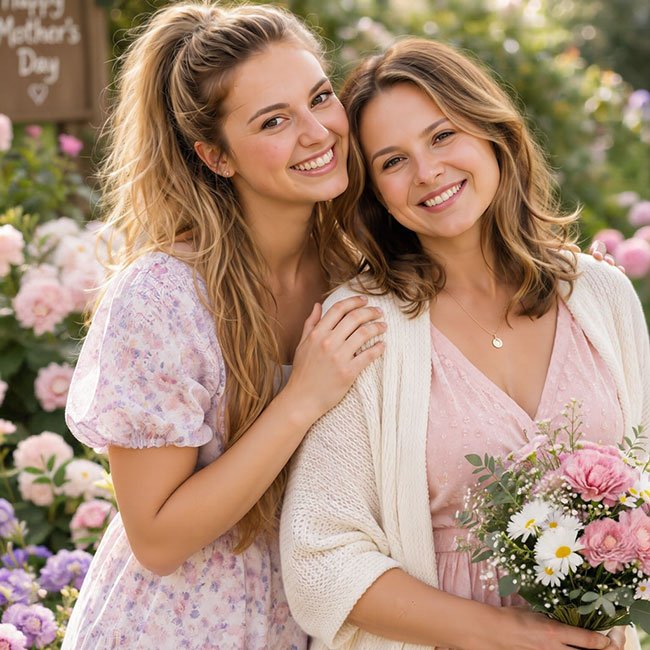
1. Beautiful Mother and Daughter Portrait
Copy the Prompt
Create a beautiful, realistic Mother’s Day portrait of a mother and her adult daughter standing close together in a charming flower garden. They are smiling naturally and sharing a warm, affectionate moment. Dress them in elegant coordinated outfits in soft pastel shades such as blush pink, cream, and lavender. Surround them with delicate flowers, lush greenery, and soft natural sunlight. Capture genuine expressions, realistic skin texture, natural hands, detailed clothing, and relaxed body language. Use professional portrait photography, gentle background blur, warm flattering light, and a timeless romantic atmosphere. Compose the image vertically with both faces clearly visible.
Best For: Mother-daughter portraits, Mother’s Day Instagram posts, greeting cards, and family photo collections.
2. Heartwarming Mother and Son Photo

Copy the Prompt
Create a heartwarming and realistic Mother’s Day photograph of a mother sharing a loving moment with her son. They are standing together in a peaceful garden, with the son gently hugging his mother while both smile naturally. Dress them in comfortable, elegant clothing in soft neutral and pastel colors. Include a few beautiful flowers and greenery in the background. Use warm natural daylight, authentic facial expressions, realistic skin texture, natural body proportions, and genuine emotion. Capture the scene like a professional lifestyle photographer documenting a meaningful family moment. Keep the composition simple, intimate, and timeless.
Best For: Mother-son pictures, heartfelt Mother’s Day greetings, family albums, and social media tributes.
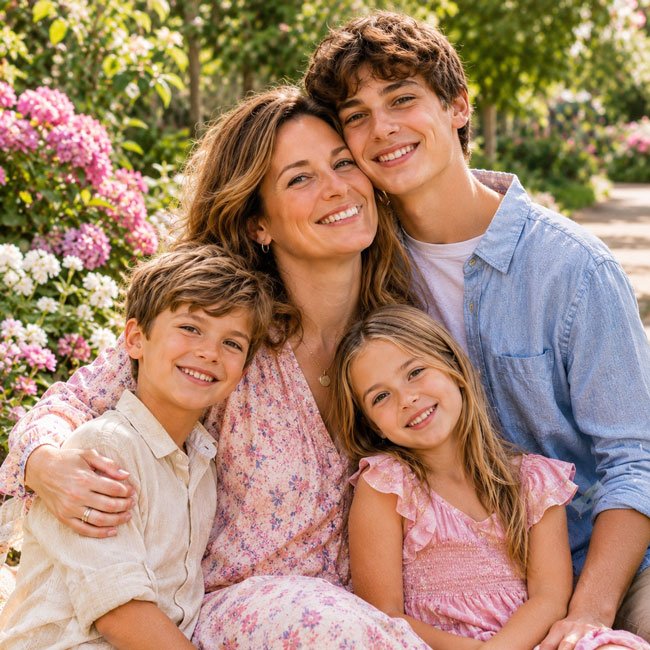
3. Mother with Children in a Beautiful Flower Garden
Copy the Prompt
Create a realistic Mother’s Day family portrait featuring a mother with her children in a beautiful blooming garden. Show them standing or sitting close together, smiling naturally and sharing a joyful family moment. Include colorful flowers, soft greenery, and a peaceful garden pathway in the background. Dress everyone in coordinated but not identical outfits in cream, light pink, soft blue, or other gentle spring colors. Capture natural interactions, authentic smiles, realistic facial details, accurate body proportions, and detailed clothing. Use soft morning sunlight, professional family photography, and a bright, uplifting atmosphere. Make sure every family member is clearly visible.
Best For: Family Mother’s Day portraits, greeting cards, family albums, and spring-themed social media posts.
4. Emotional Mother and Baby Portrait

Copy the Prompt
Create a tender and realistic Mother’s Day portrait of a mother gently holding her baby close to her chest. The mother is looking at the baby with a peaceful, loving expression, while the baby appears comfortable and relaxed. Use a soft neutral background with delicate flowers and subtle natural details. Dress the mother in a simple cream or pastel outfit and keep the baby’s clothing comfortable and understated. Capture realistic skin textures, natural hands, accurate proportions, gentle expressions, and authentic emotion. Use soft window light, warm tones, shallow depth of field, and professional newborn lifestyle photography. The overall mood should feel intimate, peaceful, and timeless.
Best For: New mothers, first Mother’s Day memories, baby photo collections, and heartfelt greeting cards.
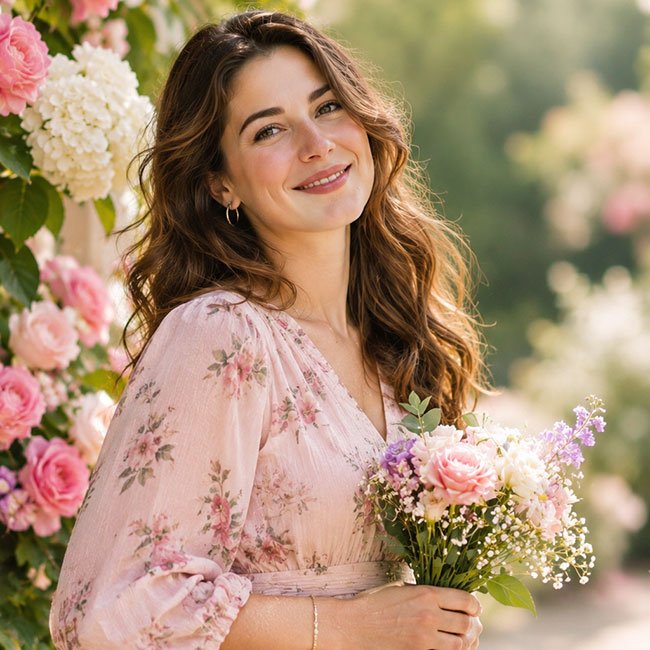
5. Elegant Mother’s Day Floral Portrait
Copy the Prompt
Create an elegant Mother’s Day portrait of a graceful woman standing in a beautiful floral setting filled with roses, peonies, and delicate seasonal flowers. She is smiling gently and holding a small bouquet of fresh flowers. Dress her in a sophisticated pastel outfit with simple elegant details. Use soft natural daylight, realistic flower textures, natural facial features, authentic skin texture, and professional editorial portrait photography. Keep the background softly blurred with beautiful floral colors and gentle highlights. The image should feel warm, graceful, and celebratory without looking overly artificial. Use a vertical composition with enough clean space for a Mother’s Day message.
Best For: Mother’s Day greeting cards, floral social media posts, Pinterest images, and elegant seasonal designs.
6. Three Generations of Women Together
Create a warm and realistic three-generation Mother’s Day family portrait featuring a grandmother, her adult daughter, and her granddaughter standing together. Show them sharing a loving moment with natural smiles and gentle affectionate gestures. Dress them in coordinated elegant outfits using soft cream, rose, and beige tones. Place them in a beautiful garden with subtle flowers and greenery. Capture the unique appearance of each generation, natural facial expressions, realistic skin textures, accurate body proportions, and authentic family connection. Use soft flattering daylight, professional portrait photography, and a timeless composition that celebrates family love across generations.
Best For: Grandmother and family tributes, multigenerational portraits, Mother’s Day cards, and family albums.
7. Mother and Daughter Hugging at Sunset
Copy the Prompt
Create an emotional and realistic Mother’s Day photograph of a mother and her daughter sharing a warm hug in an open garden during golden hour. Capture them smiling softly and enjoying the moment together. Use a beautiful sunset in the background with warm golden light illuminating their faces and hair. Dress them in coordinated flowing outfits in cream, peach, or soft pink. Include subtle flowers and greenery around them. Use realistic facial details, natural body language, accurate hands, genuine expressions, and professional lifestyle photography. The mood should feel loving, peaceful, and heartfelt, with cinematic depth and a vertical portrait composition.
Best For: Emotional Mother’s Day posts, mother-daughter tributes, greeting cards, and family memories.
8. Mother’s Day Breakfast Surprise
Copy the Prompt
Create a realistic lifestyle photograph of a family surprising their mother with a beautiful Mother’s Day breakfast at home. Show the mother sitting at a cozy dining table while her children present her with fresh flowers, a breakfast tray, and a handmade card. Include a neatly arranged table with pancakes, fruit, coffee, and a small vase of flowers. Use soft morning sunlight coming through the window, warm home decor, natural expressions, realistic food textures, and authentic family interactions. Capture the mother looking genuinely happy and touched. Use professional candid lifestyle photography with a bright, welcoming, and intimate atmosphere.
Best For: Mother’s Day storytelling, family greeting cards, lifestyle posts, and celebration inspiration.
9. Traditional Mother’s Day Family Portrait
Copy the Prompt
Create a beautiful and realistic Mother’s Day family portrait featuring a mother surrounded by her family, standing together in an elegant home setting. Dress everyone in tasteful traditional clothing with coordinated colors and subtle decorative details. The mother should be positioned naturally at the center, with family members standing close to her and smiling warmly. Include a simple floral arrangement and elegant background decor. Capture realistic skin textures, natural expressions, accurate hands, authentic body language, and detailed fabric patterns. Use soft studio-style lighting, professional family portrait photography, and a balanced composition. Keep the final image graceful, warm, and suitable for a printed family keepsake.
Best For: Traditional family portraits, printed Mother’s Day cards, family celebrations, and keepsake photographs.
10. Mother’s Day Greeting Card Photo
If you want to create a ready-to-personalize Mother’s Day greeting, this prompt leaves room for a message. You can add your own words, family name, or a short dedication after generating the
Copy the Prompt
Create an elegant Mother’s Day greeting-card image featuring a warm, beautiful portrait of a loving mother surrounded by delicate pink and white flowers. Give her a gentle, natural smile and a graceful pose. Use a soft pastel background with subtle floral details, warm natural lighting, realistic facial features, natural skin texture, and professional portrait photography. Position the mother slightly to one side of the composition and leave a large clean area on the opposite side for adding the words “Happy Mother’s Day” later. Use a sophisticated color palette of blush pink, cream, and soft green. Keep the design uncluttered, heartfelt, and suitable for a premium greeting card. Use a vertical 4:5 composition.
Best For: Mother’s Day greeting cards, digital wishes, social media graphics, and personalized family messages.
How to Make Gemini Mother’s Day Photos Look More Realistic
A good Mother’s Day portrait should feel personal and natural. Instead of adding too many decorative details, focus on the people, their expressions, and the setting.
1. Describe the Relationship
Explain whether the image features a mother and daughter, mother and son, a mother with several children, or three generations of women. This helps define the main subjects and the story you want the image to tell.
2. Choose Natural Poses
Use descriptions such as gentle hug, holding hands, sitting close together, smiling naturally, sharing a quiet moment, and relaxed body language. These can help guide the image toward a more candid style.
3. Use Soft, Flattering Lighting
Soft daylight, window light, and golden-hour sunlight are useful choices for warm family portraits. For a greeting-card design, a light pastel background can also help keep the composition clear.
4. Keep Clothing Coordinated
Choose a simple color palette such as cream, blush pink, lavender, beige, or soft blue. Coordinated clothing can make a family portrait look polished without making everyone wear exactly the same outfit.
5. Review Facial and Hand Details
AI-generated portraits can sometimes change facial features or create unnatural hands. Check the final image carefully, particularly when the picture is intended to represent real family members.
Best Image Sizes for Mother’s Day Photos
The ideal image size depends on where you plan to share your Mother’s Day picture. A vertical portrait is a versatile choice for many social platforms and greeting-card designs.
| Use | Recommended Shape | Suggested Size |
|---|---|---|
| Instagram portrait post | 4:5 | 1080 × 1350 px |
| Instagram Story | 9:16 | 1080 × 1920 px |
| Pinterest pin | 2:3 | 1000 × 1500 px |
| Facebook post | 1:1 or 4:5 | 1080 × 1080 px or 1080 × 1350 px |
| Website article image | 4:5 | 1200 × 1500 px |
| Digital greeting card | 4:5 or 5:7 | 1200 × 1500 px or similar |
For your website, a vertical image around 1200 × 1500 pixels is a practical starting point. Compress images before uploading them to improve page loading speed, especially for mobile visitors.
How to Customize These Mother’s Day Prompts
You can personalize the prompts by changing a few details to match your family and the style of image you want.
1. Change the Family Members
Replace the subjects with a mother and daughter, mother and son, grandmother and grandchildren, or a mother surrounded by her entire family. Clearly state how many people should appear.
2. Change the Background
Try a flower garden, cozy living room, elegant studio, outdoor park, family dining room, or a beautiful sunset location. Choose a setting that matches the mood of the image.
3. Choose Your Favorite Clothing Style
Use elegant dresses, casual outfits, coordinated pastel clothing, traditional attire, or simple everyday clothes. If you want a more personal result, describe the colors and clothing details you prefer.
4. Change the Mood
For a warm portrait, use words such as loving, peaceful, heartfelt, joyful, and natural. For a more polished image, try elegant, timeless, graceful, and editorial.
5. Leave Space for a Mother’s Day Message
If the image is for a greeting card, ask the AI to leave clean space at the top or side. Add your own message afterward so that the spelling and design are exactly as you want them.
Common Problems with AI Mother’s Day Photos
1. The Faces Don’t Look Like the Reference Photo
If your tool supports reference images, explain which facial and appearance details you want to preserve. However, exact likeness is not guaranteed. Review the result and try a simpler prompt if the image changes too much.
2. The AI Adds Extra Family Members
Clearly specify the number of people in the portrait and describe their positions. If the result is still incorrect, simplify the background and regenerate the image.
3. The Hands Look Unnatural
Ask for natural hand positions, realistic fingers, and accurate proportions. You can also choose poses where hands are resting naturally or gently holding flowers.
4. The Image Looks Too Artificial
Use phrases such as realistic skin texture, natural facial expressions, soft daylight, authentic body language, and professional lifestyle photography. Avoid excessive retouching and unrealistic beauty effects.
5. The Flowers Cover the Main Subject
Ask for flowers as subtle background decorations or small arrangements rather than large foreground elements. Keep the mother and family members as the main focus.
6. The Greeting Text Is Incorrect
Generate the image without text and add the message afterward using an image editor. This makes it easier to control the wording, font, and placement.
A Simple Formula for Better Mother’s Day Photo Prompts
If you want to create your own Mother’s Day prompts, use this simple structure:
Main subjects + Relationship + Location + Clothing + Pose + Lighting + Photography style + Composition
For example:
Create a realistic portrait of a mother and her daughter standing together in a beautiful flower garden, wearing coordinated pastel outfits, sharing a gentle hug, surrounded by roses and greenery, photographed in soft golden-hour light, with natural expressions, realistic skin texture, professional family photography, and a vertical 4:5 composition.
You can use this formula for almost any Mother’s Day image. Change the people, location, clothing, and mood to create a different result.
Frequently Asked Questions
Q1. Can I use these prompts with Google Gemini?
Yes. These prompts are written as general image-generation instructions that can be adapted for Google Gemini where image generation is available. Features and interface options may vary depending on your account and region.
Q2. Can I create Mother’s Day photos using my own family pictures?
If your version of Gemini supports uploading and editing reference images, you may be able to use a suitable family photograph as a starting point. The generated image may still change facial features, clothing, and other details, so review the result carefully.
Q3. How can I make a realistic mother-daughter AI photo?
Describe natural expressions, gentle interaction, coordinated outfits, realistic skin texture, and soft lighting. A clear description of the background and pose can also help guide the result.
Q4. What is a good prompt for a first Mother’s Day photo?
A mother holding her baby in a softly lit room or flower garden is a lovely starting point. Use gentle expressions, comfortable clothing, a simple background, and natural lighting to create a warm portrait.
Q5. Can I create a Mother’s Day photo with three generations?
Yes. You can describe a grandmother, mother, and daughter standing or sitting together. Mention the number of people, their positions, coordinated clothing, and natural expressions.
Q6. What size is best for Mother’s Day Instagram photos?
A vertical 4:5 image around 1080 × 1350 pixels is a practical choice for Instagram portrait posts. For Stories, a 9:16 image around 1080 × 1920 pixels is commonly used.
Q7. Can I use these AI-generated images for Mother’s Day cards?
You can adapt the image ideas for digital or printed greeting cards, subject to the applicable terms of the AI image tool. If you need exact wording, add the greeting after generating the image.
Q8. How do I make a Mother’s Day photo more personal?
Use a meaningful location, preferred clothing colors, favorite flowers, or a pose that reflects the relationship. If supported, a reference photo may help guide the image, although exact reproduction is not guaranteed.
Final Thoughts
Mother’s Day is about celebrating the people who make life feel special. A thoughtful photograph can become a lovely way to express that appreciation, whether it features a mother and daughter, a mother and son, children, or several generations of a family.
The Gemini AI prompts in this guide offer different ideas to help you get started. Choose the style you like, customize the details, and experiment with different backgrounds, outfits, and lighting.
For the most natural-looking results, focus on genuine expressions, realistic details, and simple compositions. If you are creating a greeting card, leave space for your own message and add the final text after generating the image.
Most importantly, make the picture meaningful to the people it celebrates. Sometimes a simple family portrait is more memorable than an elaborate design.
Last updated: 03 November 2026