Halloween is a wonderful time to create fun family memories, whether you’re dressing up in matching costumes, visiting a pumpkin patch, decorating your home, or planning a spooky family photoshoot. With the right photo idea, you can turn those Halloween moments into creative pictures to share with friends and family.
If you want to experiment with AI-generated Halloween pictures, Google Gemini can help you explore different themes, outfits, backgrounds, and photography styles. You can create cozy autumn portraits, funny costume photos, magical Halloween scenes, and dramatic family pictures without arranging a traditional photoshoot.
In this guide, you’ll find Gemini AI prompts for Halloween family photos that you can copy and customize. Each prompt has a different style, making it easier to find an idea that suits your family’s personality, preferred costumes, and Halloween plans.
For the most personalized results, adapt the prompts to your family and use a reference photo if your version of the tool supports image uploads. AI-generated results can vary, so you may need to make a few adjustments to get the look you want.
What You’ll Find in This Guide
- Copy-ready Gemini AI prompts for Halloween family photos
- Matching family costume photo ideas
- Cute Halloween portraits with pumpkins
- Spooky and cinematic family photos
- Ideas for parents, children, and multigenerational families
- Tips for making AI-generated family photos look natural
- Recommended image sizes for social media
- Ways to customize prompts and fix common image problems
Whether you prefer a cute Halloween aesthetic or a dramatic spooky theme, these prompts give you a practical starting point for creating your own seasonal images.
How to Use Gemini AI Prompts for Halloween Family Photos
Choose a prompt from the list below and paste it into Gemini’s image-generation experience, if available on your account. You can modify the clothing, number of family members, setting, lighting, and mood to suit your idea.
If you want the generated image to resemble your actual family, you may be able to upload a suitable reference photo, depending on the features available to you. Clearly explain which details you want to preserve and which elements you want to change.
For example, you might want to keep the family’s general appearance while changing their outfits to matching Halloween costumes and placing them in a pumpkin-filled autumn setting.
Privacy tip: Before uploading family photographs, especially pictures of children, review the tool’s applicable privacy settings and terms. Only upload images you have the right to use.
Important: AI-generated images may alter facial features, hands, clothing details, or the number of people in a scene. Review the result carefully before sharing it as a family portrait.
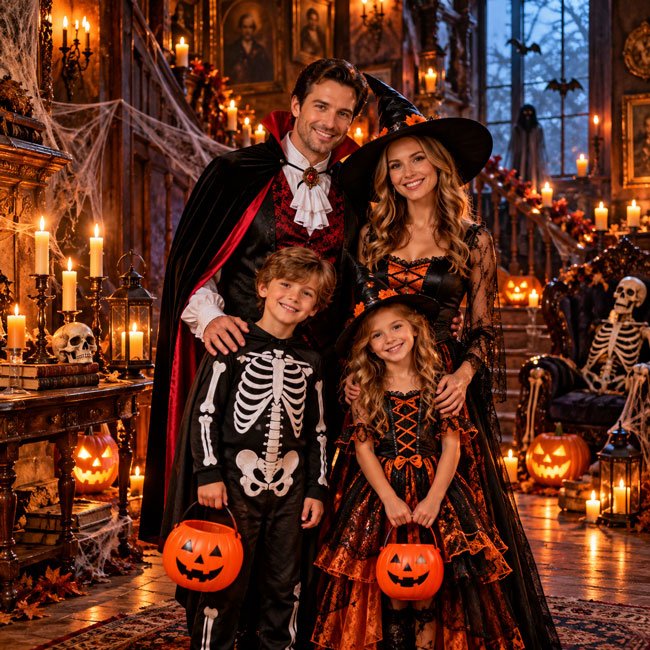
1. Matching Halloween Costumes Family Photo
Matching costumes are a classic choice for family Halloween pictures. This prompt creates a coordinated portrait with a festive atmosphere while giving each family member room to have their own look.
Copy the Prompt
Create a realistic Halloween family portrait featuring a family standing together in coordinated Halloween costumes. Give each family member a complementary costume inspired by a friendly Halloween theme, with thoughtful details, comfortable fabrics, and colors that work well together. Place the family in a festive autumn setting decorated with pumpkins, orange leaves, warm lanterns, and subtle Halloween decorations. Capture natural smiles, relaxed poses, realistic skin texture, accurate body proportions, and genuine family connection. Use soft cinematic lighting, professional family photography, and a clean composition. Keep the scene cheerful and welcoming rather than frightening. Use a vertical 4:5 composition with the entire family clearly visible.
Best For: Family Halloween portraits, Instagram posts, seasonal greeting cards, and Halloween photo collections.
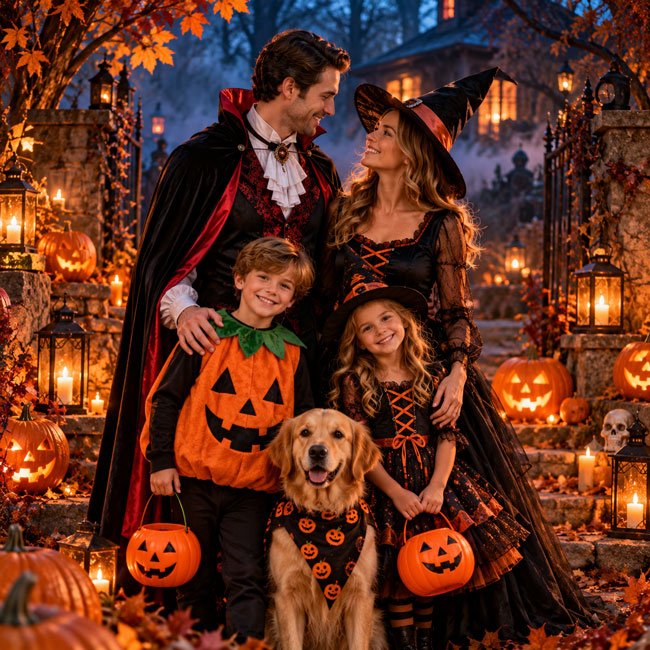
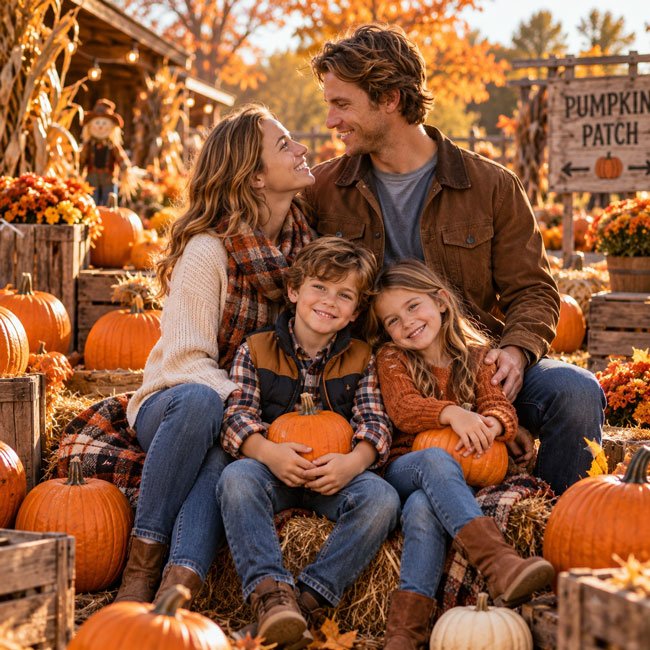
2. Cute Halloween Family Photo with Pumpkins
If you prefer something warm and family-friendly, a pumpkin-themed portrait is an easy option. Orange pumpkins, autumn leaves, and cozy clothing create a seasonal look that works for both adults and children.
Copy the Prompt
Create a beautiful, realistic Halloween family photograph in a charming pumpkin patch. Show the family sitting and standing naturally among orange pumpkins, rustic wooden crates, hay bales, and golden autumn leaves. Dress everyone in cozy fall outfits with subtle Halloween colors such as burnt orange, cream, brown, and black. Include natural smiles, genuine expressions, realistic skin textures, detailed clothing, and believable body language. Use warm afternoon sunlight, soft background blur, and professional lifestyle photography. Keep the scene bright, cheerful, and relaxed, like a real family outing during pumpkin season. Use a vertical composition suitable for a family portrait.
Best For: Pumpkin patch photos, autumn family posts, Halloween cards, and Pinterest inspiration.
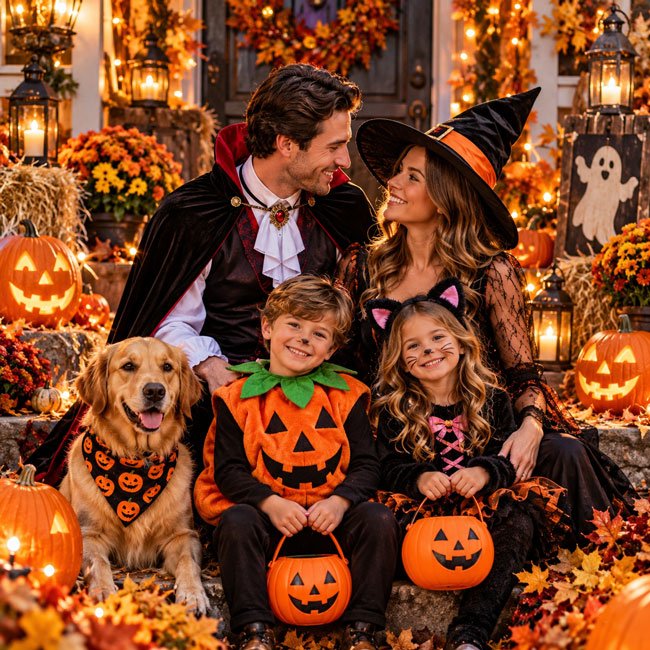
3. Spooky Halloween Family Portrait
For families who enjoy a darker Halloween aesthetic, try a dramatic portrait with a mysterious background, glowing pumpkins, and cinematic lighting. The result can feel spooky without becoming overly frightening.
Copy the Prompt
Create a cinematic Halloween family portrait featuring a family dressed in stylish, coordinated spooky costumes. Place them in a mysterious autumn garden with carved jack-o’-lanterns, twisted tree branches, old lanterns, and a light layer of atmospheric fog. Use warm orange light from the pumpkins mixed with cool blue evening light. Give everyone natural expressions and comfortable, believable poses. Include realistic costume textures, accurate anatomy, detailed faces, and professional cinematic photography. Make the atmosphere mysterious and magical rather than graphic or terrifying. Keep the family clearly visible and use a balanced vertical composition with rich Halloween colors.
Best For: Spooky Halloween posts, dramatic family portraits, Halloween party invitations, and themed wallpapers.
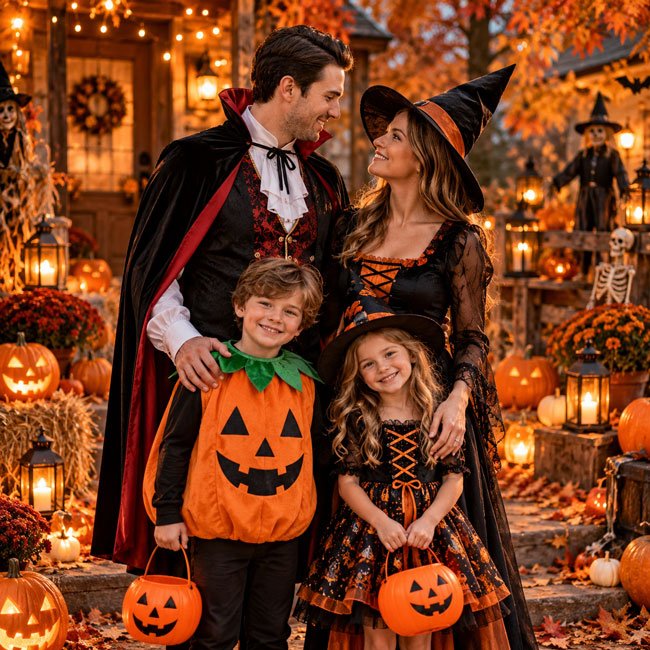
4. Halloween Family Photo in a Haunted House
A haunted-house setting can add atmosphere and storytelling to a Halloween portrait. This prompt combines old-fashioned decorations, candlelight, and spooky details while keeping the family at the center of the scene.
Copy the Prompt
Create a realistic Halloween family portrait inside a beautifully decorated haunted house. Show the family standing together in coordinated costumes in an old-fashioned room with wooden floors, antique furniture, carved pumpkins, candlelit lanterns, and decorative cobwebs. Add subtle shadows and atmospheric lighting without hiding the family members’ faces. Use detailed costume fabrics, realistic skin texture, natural expressions, believable body proportions, and professional editorial photography. The mood should feel mysterious, playful, and theatrical rather than frightening. Include enough ambient light to show the decorations clearly and compose the image vertically for a Halloween family portrait.
Best For: Haunted-house themes, Halloween party graphics, spooky family pictures, and seasonal social media posts.
5. Cute Halloween Family Photo with Kids
For a sweeter Halloween theme, focus on playful costumes, colorful decorations, and natural family interactions. This style is ideal when you want a cheerful seasonal image instead of a dark or dramatic one.
Copy the Prompt
Create a warm, cheerful Halloween family photograph featuring parents and children wearing cute, age-appropriate Halloween costumes. Use friendly costume ideas such as little pumpkins, friendly ghosts, black cats, or storybook-inspired outfits. Place the family in a festive setting with pumpkins, autumn leaves, soft fairy lights, and simple Halloween decorations. Capture genuine smiles, playful but natural poses, realistic skin textures, accurate proportions, and detailed clothing. Use soft, flattering lighting and professional family photography. Keep the mood wholesome, colorful, and joyful, with the children’s comfort and natural expressions as the focus. Avoid frightening props or overly dramatic shadows.
Best For: Family albums, children’s Halloween cards, cute seasonal posts, and family-friendly Pinterest boards.
6. Elegant Black-and-Orange Halloween Family Portrait
Not every Halloween image needs costumes or lots of decorations. A coordinated black-and-orange portrait can look stylish, modern, and seasonal without becoming too busy.
Copy the Prompt
Create a sophisticated Halloween family portrait featuring a family wearing coordinated black, burnt orange, and neutral outfits. Choose elegant clothing with subtle seasonal details rather than elaborate costumes. Place the family in a refined autumn setting with a few pumpkins, dark florals, dried leaves, and warm lantern light. Use balanced studio-style lighting, realistic skin texture, natural facial expressions, accurate body proportions, and professional editorial family photography. Keep the composition uncluttered, with rich autumn colors, gentle shadows, and a polished but natural finish. Make the image suitable for a stylish Halloween greeting card or seasonal family portrait.
Best For: Elegant Halloween cards, family portraits, minimalist social media posts, and seasonal invitations.
7. Halloween Family Photo by a Glowing Jack-o’-Lantern
Glowing jack-o’-lanterns create a recognizable Halloween atmosphere. This prompt uses the pumpkins as a source of warm light while keeping the family visible and the overall image balanced.
Copy the Prompt
Create a realistic Halloween family photograph at dusk, with the family gathered around several glowing jack-o’-lanterns. The pumpkins should cast a warm orange glow across the scene while soft evening light keeps the family members’ faces visible. Include autumn leaves, a rustic porch or garden, and a few tasteful Halloween decorations in the background. Dress the family in coordinated seasonal outfits or simple Halloween costumes. Use realistic lighting, natural expressions, believable hands and faces, detailed pumpkin carvings, and professional low-light photography. Keep the scene cozy, magical, and slightly spooky, with a vertical composition and balanced contrast.
Best For: Halloween night posts, pumpkin-carving photos, seasonal wallpapers, and family Halloween cards.
8. Vintage Halloween Family Photo
A vintage-inspired Halloween picture can feel nostalgic, as if it came from an old family album. Muted colors, subtle film grain, and classic clothing help create a timeless seasonal look.
Copy the Prompt
Create a nostalgic vintage-style Halloween family portrait inspired by classic film photography. Show the family standing together in a cozy autumn setting with carved pumpkins, old-fashioned lanterns, dried leaves, and subtle vintage decorations. Dress everyone in timeless Halloween-inspired outfits with classic silhouettes and understated colors. Use warm muted tones, gentle film grain, soft contrast, realistic facial details, natural poses, and authentic fabric textures. The image should resemble a carefully composed photograph from an old family album while retaining clear, believable details. Avoid excessive scratches or artificial aging effects. Use a vertical composition with a warm nostalgic mood.
Best For: Vintage Halloween designs, nostalgic family posts, themed invitations, and autumn photo collections.
9. Magical Halloween Family Photo in an Enchanted Forest
If you want something more imaginative, try a magical forest scene with glowing lanterns, autumn leaves, and subtle fantasy elements. This idea is ideal for families who enjoy storybook-inspired Halloween themes.
Copy the Prompt
Create a magical Halloween family portrait in an enchanted autumn forest. Show the family standing together on a leaf-covered path surrounded by golden trees, softly glowing lanterns, pumpkins, and delicate floating lights. Dress them in coordinated fantasy-inspired Halloween outfits with elegant capes, textured fabrics, and subtle magical details. Use atmospheric mist, warm glowing highlights, deep autumn colors, realistic facial features, natural body language, and detailed clothing. Blend the fantasy elements with realistic photographic lighting so the scene feels enchanting rather than cartoonish. Keep every family member clearly visible and use a cinematic vertical composition.
Best For: Fantasy Halloween portraits, creative family posts, storybook-inspired images, and Halloween invitations.
10. Halloween Family Portrait with a Black Cat
A black cat is a classic Halloween symbol. This prompt creates a family portrait with a playful feline detail while keeping the animal and family members natural and clearly visible.
Copy the Prompt
Create a realistic Halloween family portrait featuring a family in coordinated black and autumn-colored outfits, with a calm black cat sitting nearby. Place them in a cozy decorated setting with pumpkins, dried leaves, warm lanterns, and subtle Halloween decorations. Give the cat realistic fur, natural proportions, and a relaxed posture. Show the family smiling naturally and interacting comfortably with the scene. Use soft warm lighting, realistic skin textures, accurate anatomy, detailed clothing, and professional family photography. Keep the mood charming, slightly mysterious, and welcoming. Ensure the cat remains clearly visible and the composition feels balanced rather than crowded.
Best For: Pet-loving families, Halloween greeting cards, seasonal social posts, and cat-themed Halloween images.
How to Make Gemini Halloween Family Photos Look Realistic
A detailed prompt can help guide the image, but adding more words does not always guarantee a better result. The most useful descriptions focus on the subject, setting, lighting, pose, and overall photography style.
1. Describe Each Family Member Clearly
Specify how many people should appear in the image and describe their general positions. If your family includes children, adults, or grandparents, mention that clearly so the composition has a better chance of matching your idea.
2. Use Natural Poses
Try phrases such as relaxed body language, candid family moment, natural smiles, genuine interaction, and comfortable poses. These descriptions can help guide the image away from a stiff, overly formal look.
3. Choose a Consistent Lighting Style
Use soft daylight for cheerful portraits, golden-hour light for warm autumn images, or lantern and pumpkin light for spooky scenes. Keeping the lighting consistent helps the image feel more believable.
4. Keep Costumes Coordinated
Describe a shared color palette or theme instead of asking every person to wear an identical outfit. Coordinated colors can make the family look connected while allowing each costume to remain distinct.
5. Check Faces, Hands, and the Number of People
AI-generated images can sometimes change facial features, add extra fingers, duplicate objects, or include an incorrect number of people. Review the image carefully and regenerate it if the errors are noticeable.
Best Image Sizes for Halloween Family Photos
The best image dimensions depend on where you plan to share the picture. A vertical image is useful for many mobile-first platforms, while square images can work well for profile pictures and some social posts.
| Use | Recommended Shape | Suggested Size |
|---|---|---|
| Instagram portrait post | 4:5 | 1080 × 1350 px |
| Instagram Story or Reel cover | 9:16 | 1080 × 1920 px |
| Pinterest pin | 2:3 | 1000 × 1500 px |
| Square social media post | 1:1 | 1080 × 1080 px |
| Website article image | 4:5 | 1200 × 1500 px |
For your website, a vertical image around 1200 × 1500 pixels is a practical starting point for portrait-style examples. Compress images appropriately and use descriptive filenames and alt text that accurately describe each image.
How to Customize These Gemini AI Prompts
You can make each prompt more personal by changing a few details instead of rewriting everything from scratch.
1. Change the Halloween Theme
Try friendly ghosts, pumpkins, witches, black cats, skeleton-inspired costumes, storybook characters, or a classic autumn theme. Keep the costumes coordinated if you want the family to look like part of the same scene.
2. Change the Location
Replace the haunted house or pumpkin patch with your front porch, living room, garden, forest path, or a decorated family home.
3. Change the Color Palette
For a classic Halloween look, use orange, black, and purple. For a softer autumn style, try cream, brown, rust, and olive green. For a dramatic portrait, consider black, burgundy, and warm gold.
4. Change the Photography Style
Add descriptions such as candid family photography, editorial portrait, vintage film photography, cinematic lighting, or bright lifestyle photography. Choose one main style so the final image has a clear direction.
5. Leave Space for a Halloween Message
If you want to create a greeting card or social media graphic, ask for an uncluttered area at the top or side of the image. Add your own text afterward to ensure the message is spelled correctly.
Common Problems with AI Halloween Family Photos
1. The Image Has the Wrong Number of Family Members
State the number of people clearly and describe their positions in the scene. If the result still contains extra or missing people, try a simpler composition or regenerate the image.
2. Faces Look Different from the Reference Photo
If image references are supported, explain which features you want to preserve. Even with a reference photo, AI tools may alter faces, expressions, and other details, so check the result carefully.
3. The Costumes Look Inconsistent
Describe a shared theme and color palette. For example, ask for coordinated black-and-orange outfits with different costume details for each family member.
4. The Lighting Is Too Dark
For spooky scenes, request visible facial details, balanced exposure, and enough ambient light. For brighter family photos, use soft daylight or golden-hour lighting.
5. The Image Looks Too Artificial
Ask for realistic skin texture, believable proportions, natural expressions, detailed fabrics, and professional photography. Avoid combining too many fantasy effects with a realistic photography style.
6. Text Appears Incorrect
Generate the family portrait without text and add the greeting separately using an image editor. This gives you control over spelling, font, size, and placement.
A Simple Formula for Better Halloween Family Photo Prompts
Use this structure when you want to create your own prompt:
Family members + Halloween theme + Costumes + Location + Pose + Lighting + Photography style + Composition
For example:
Create a realistic portrait of a family of four wearing coordinated Halloween costumes, standing together on a decorated front porch, surrounded by pumpkins and autumn leaves, smiling naturally, photographed in warm evening light, professional family photography, realistic skin texture, natural body language, and a vertical 4:5 composition.
Start with this basic structure, then add only the details that are important to your idea. If the result doesn’t match your expectations, adjust one element at a time so you can identify which change helps.
Frequently Asked Questions
Q1. Can I use these prompts in Google Gemini?
Yes. These prompts are written as general image-generation instructions that you can adapt for Gemini where image generation is available. Features and interface options may vary depending on your account and region.
Q2. Can Gemini create Halloween photos using my family picture?
If your version of Gemini supports uploading and editing reference images, you may be able to use a family photograph as a starting point. The generated result may still change faces, clothing, or other details, so check the output before sharing it.
Q3. How do I make matching Halloween costume photos?
Describe one shared costume theme and a consistent color palette, then give each family member a complementary outfit. This can help create a coordinated look without making everyone appear identical.
Q4. What is the best prompt for a cute Halloween family photo?
A pumpkin patch scene with cozy autumn clothing, warm daylight, natural smiles, and simple decorations is a useful starting point. You can make it more playful by adding friendly costumes and colorful pumpkins.
Q5. Can I create spooky Halloween family portraits with AI?
Yes. Try a haunted-house setting, glowing jack-o’-lanterns, atmospheric fog, dark autumn trees, and warm lantern lighting. Specify that faces should remain visible if you want the final image to work as a family portrait.
Q6. What size should I use for a Halloween family photo on Instagram?
A vertical 4:5 image around 1080 × 1350 pixels is a practical option for an Instagram portrait post. For Stories, a 9:16 format around 1080 × 1920 pixels is commonly used.
Q7. Can I use AI-generated Halloween family images on my website?
That depends on the image tool’s terms and your intended use. Check applicable licensing requirements before publishing or using images commercially. When relevant, make it clear that an image is AI-generated rather than a real photograph of an event.
Q8. How can I make the image look more like a real family photo?
Use a clear description of the family members, natural poses, consistent lighting, realistic proportions, and a believable background. If supported, a suitable reference photo may help, although exact likeness is not guaranteed.
Final Thoughts
Halloween family photos can be cute, spooky, elegant, nostalgic, or completely imaginative. With the right prompt, you can explore different seasonal looks and create images that fit your family’s personality.
Start with one of these Gemini AI prompts and customize the costumes, setting, lighting, and composition. If the first result isn’t quite right, simplify the scene or change one detail at a time.
For the best results, focus on natural expressions, believable lighting, coordinated outfits, and a clear visual theme. Before sharing your finished image, review it for unusual details and make sure it represents the scene accurately.
Whether you choose a cheerful pumpkin portrait or a dramatic haunted-house scene, these prompts can help you get started on a creative Halloween family photo.
Last updated: October 2026