There is something special about pumpkin patch season. Rows of orange pumpkins, golden autumn leaves, cozy sweaters, hay bales, and warm fall sunlight create the perfect setting for memorable Halloween photos.
Whether you want a cute family portrait, a romantic pumpkin patch photo, a playful picture with your kids, or a spooky Halloween-inspired image, AI image generators can help you explore different styles without needing to arrange an actual photoshoot.
In this guide, you’ll find AI prompts for Halloween pumpkin patch photos that you can copy, customize, and try with Google Gemini or another AI image generator. Each prompt focuses on a different look, from cozy autumn portraits to cinematic Halloween scenes.
You can use these ideas for personal photos, seasonal social media posts, Halloween invitations, or creative autumn-themed designs. Adjust the outfits, setting, lighting, and mood to create an image that matches your style.
What You’ll Find in This Guide
- Ready-to-copy Halloween pumpkin patch photo prompts
- Cozy autumn portraits for couples and families
- Cute pumpkin patch photo ideas for kids
- Spooky Halloween scenes with pumpkins and lanterns
- Creative ideas for Instagram and Pinterest
- Tips for more realistic AI-generated photos
- Recommended image sizes for social media
- Ways to customize your prompts for different styles
- Solutions to common AI image-generation problems
Each prompt is a starting point rather than a guarantee of an exact result. AI-generated images can vary, so you may need to adjust the wording or generate several versions to find the one you like best.
How to Use These Halloween Pumpkin Patch Prompts
Choose a prompt that matches the image you want to create, copy it, and paste it into your preferred AI image generator. If your tool supports reference photos, you may also be able to use a suitable photo to guide the result.
For more useful results, describe the important details: who is in the photo, what they are wearing, where they are standing, the lighting, the mood, and the composition.
If you’re creating a photo of yourself or your family, you can customize the prompt with your preferred clothing, hairstyle, age range, and pose. When uploading photos of other people, make sure you have permission to use them.
Tip: If you plan to add a Halloween greeting or a name to the image, ask the AI to leave some uncluttered space. Add the final text afterward if you need exact spelling.
1. Cozy Autumn Pumpkin Patch Portrait
This is a great starting point for a classic pumpkin patch photo. Warm sweaters, rustic wooden crates, and rows of pumpkins create a cozy autumn look that works well for seasonal portraits.
Copy the Prompt
Create a realistic autumn portrait of a person standing in a charming pumpkin patch on a crisp fall afternoon. Surround them with bright orange pumpkins, rustic wooden crates, hay bales, and trees with golden and amber leaves. Dress them in a cozy oversized knit sweater, jeans, and ankle boots in warm autumn colors. Use soft golden-hour sunlight, natural facial expressions, realistic skin texture, detailed fabric, gentle background blur, and professional lifestyle photography. The mood should feel warm, relaxed, and authentic, like a beautiful candid photograph taken during a fall outing. Use a vertical 4:5 composition with rich but natural autumn colors.
Best For: Autumn portraits, Instagram posts, Pinterest images, and seasonal profile pictures.
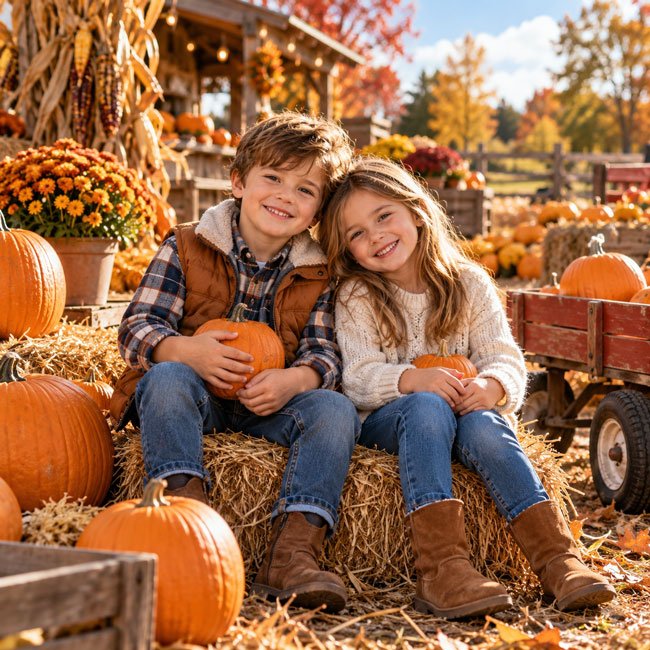
2. Cute Kids at a Halloween Pumpkin Patch
A pumpkin patch can be a playful setting for children’s Halloween photos. This prompt focuses on cheerful expressions, colorful pumpkins, and age-appropriate fall outfits rather than frightening Halloween details.
Copy the Prompt
Create a natural, cheerful photograph of two young children enjoying a family visit to a pumpkin patch. They are sitting beside a few pumpkins and smiling with genuine excitement. Include hay bales, small wooden wagons, colorful autumn leaves, and a rustic farm stand in the background. Dress the children in comfortable fall outfits with cozy sweaters, denim, boots, and subtle Halloween colors such as orange, cream, and brown. Use soft daylight, realistic proportions, natural expressions, detailed clothing, authentic skin texture, and professional family photography. Keep the atmosphere playful, wholesome, and age-appropriate, with a softly blurred autumn background.
Best For: Family Halloween posts, autumn memory boards, seasonal cards, and children’s photo inspiration.
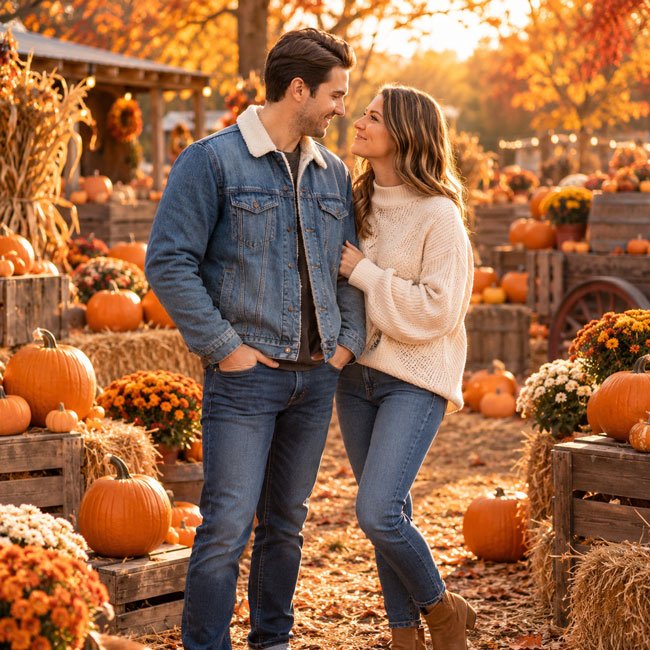
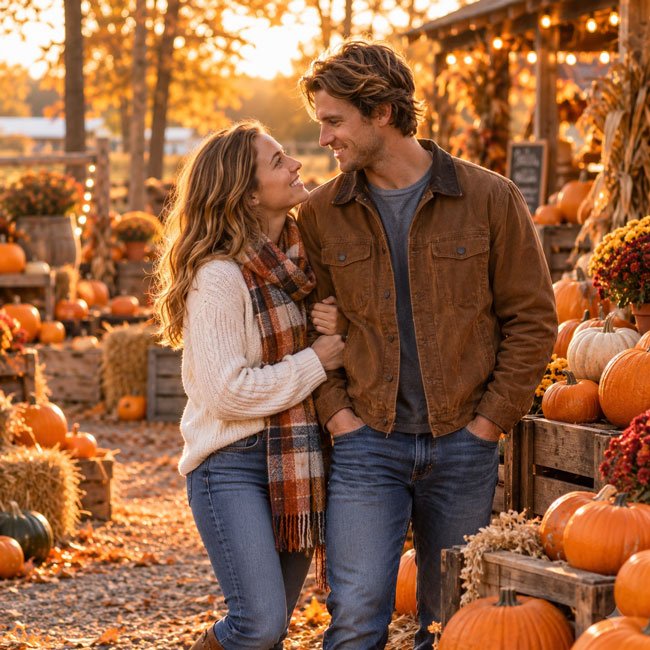
3. Romantic Couple Pumpkin Patch Photos
If you want a fall photo with your partner, this prompt creates a romantic but relaxed pumpkin patch scene. Matching autumn colors and soft light help the image feel coordinated without looking overly staged.
Copy the Prompt
Create a romantic, realistic photo of a couple enjoying a fall afternoon together at a pumpkin patch. They are standing close beside a rustic wooden pumpkin display, smiling naturally and looking at each other with affection. Dress them in coordinated autumn outfits, such as a warm brown jacket, a cream sweater, denim, and boots. Surround them with orange pumpkins, hay bales, and trees with golden leaves. Use soft golden-hour lighting, realistic skin texture, natural body language, authentic smiles, and professional couple photography. The mood should feel candid, warm, and intimate rather than posed. Compose the image vertically with a gently blurred background.
Best For: Couple portraits, fall date photos, Instagram posts, and seasonal anniversary content.
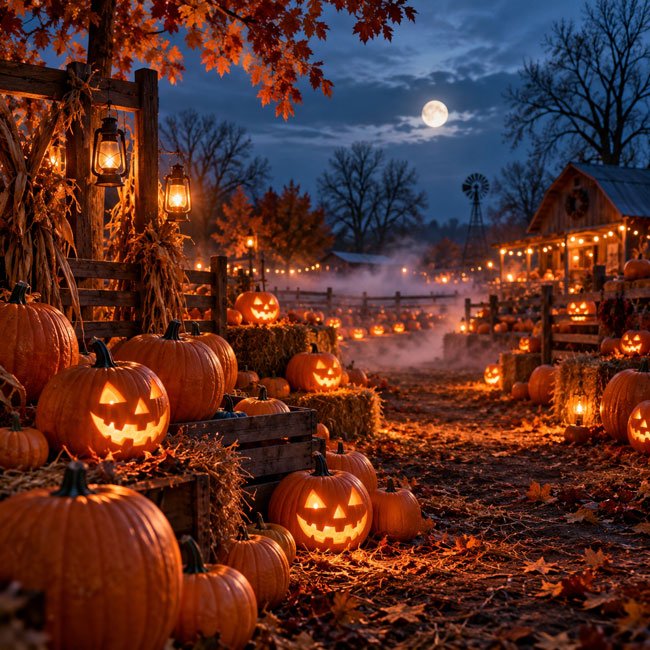
4. Spooky Pumpkin Patch at Dusk
For a more dramatic Halloween look, try a pumpkin patch at dusk. Glowing jack-o’-lanterns, light ground fog, and a deep evening sky can create a spooky atmosphere without turning the scene into full horror.
Copy the Prompt
Create a cinematic Halloween photograph of a pumpkin patch at dusk. Arrange rows of orange pumpkins across a rustic farm field, with several carved jack-o’-lanterns glowing softly from within. Add a thin layer of ground fog, distant bare trees, a deep blue evening sky, and a few warm lantern lights. The scene should feel mysterious and atmospheric, with detailed pumpkin textures, realistic shadows, balanced contrast, and professional cinematic photography. Keep the setting spooky but not graphic or frightening. Use a vertical composition, realistic lighting, rich orange and midnight-blue tones, and enough visual depth to make the pumpkin patch feel expansive.
Best For: Halloween backgrounds, spooky social media posts, seasonal wallpapers, and Pinterest graphics.
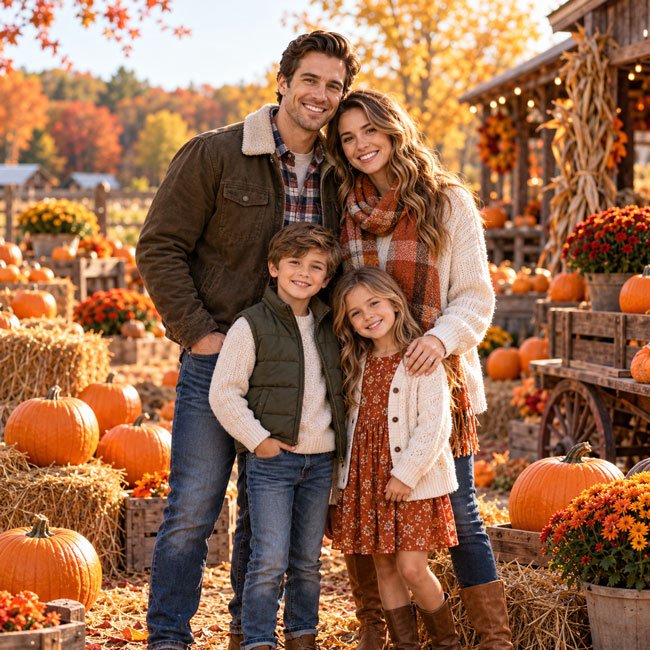
5. Family Pumpkin Patch Photos with Matching Outfits
Coordinated clothing can make a family photo look polished without requiring everyone to wear exactly the same outfit. This prompt uses a natural farm setting and a balanced autumn color palette.
Copy the Prompt
Create a realistic family portrait at a beautiful autumn pumpkin patch. Show two adults and their children standing together among pumpkins, hay bales, and rustic farm decorations. Everyone should look relaxed and happy, with natural smiles and comfortable body language. Coordinate their outfits using warm neutral shades, cream, rust orange, olive green, denim, and brown without making the clothing identical. Use soft afternoon sunlight, realistic skin tones, authentic expressions, detailed clothing, and professional family portrait photography. Keep the background colorful but not distracting. The final image should feel like a genuine family fall outing, with a vertical composition suitable for a family photo card.
Best For: Family portraits, autumn greeting cards, seasonal photo collections, and social media covers.
6. Halloween Witch at the Pumpkin Patch
If you prefer a costume-inspired image, a witch-themed pumpkin patch offers a fun balance of Halloween style and autumn scenery. You can make the look cute, elegant, or more dramatic by changing the costume details.
Copy the Prompt
Create a stylish Halloween portrait of an adult wearing an elegant black witch-inspired outfit and a wide-brimmed black hat in a pumpkin patch. Surround the person with orange pumpkins, dried autumn leaves, rustic wooden decorations, and a few softly glowing jack-o’-lanterns. Add subtle dark-romantic details such as a flowing black cape, lace accents, and warm candlelight. Use dramatic but flattering lighting, realistic fabric textures, natural facial features, detailed makeup, and professional editorial photography. The mood should be magical, fashionable, and autumnal rather than frightening. Use rich black, burnt orange, and deep burgundy tones in a vertical portrait composition.
Best For: Halloween costume inspiration, adult seasonal portraits, themed social media posts, and creative autumn imagery.
7. Golden-Hour Pumpkin Patch Portrait
Golden-hour light can give a pumpkin patch image a soft, glowing finish. This prompt is especially useful if you want a bright autumn portrait with gentle highlights rather than a spooky Halloween look.
Copy the Prompt
Create a professional autumn portrait in a pumpkin patch during golden hour, just before sunset. The subject is standing among pumpkins with soft sunlight illuminating their hair and face. Include warm orange pumpkins, amber leaves, rustic farm details, and a gentle sun flare in the distance. Dress the subject in a textured autumn outfit with natural colors such as cream, caramel, rust, or olive. Use realistic skin texture, lifelike facial features, natural posture, soft shadows, shallow depth of field, and editorial lifestyle photography. The image should feel warm, peaceful, and naturally beautiful, with realistic highlights and no excessive retouching.
Best For: Autumn portraits, seasonal profile pictures, lifestyle photography inspiration, and fall-themed website images.
8. Vintage Pumpkin Patch Photos
A vintage-inspired image can make an ordinary pumpkin patch look like a memory from another time. Muted colors, subtle film grain, and nostalgic styling help create this effect.
Copy the Prompt
Create a nostalgic vintage-style photograph taken at a rustic pumpkin patch in autumn. Show a person wearing a timeless outfit such as a corduroy jacket, knit sweater, denim, and classic boots, standing beside a wooden crate filled with pumpkins. Include fallen leaves, an old farm wagon, and a softly blurred countryside background. Use muted autumn colors, gentle film grain, subtle analog texture, soft contrast, natural expressions, realistic details, and the look of carefully composed film photography. Keep the image authentic rather than heavily filtered, with warm nostalgic tones and a relaxed seasonal mood.
Best For: Vintage photo concepts, autumn mood boards, Pinterest inspiration, and nostalgic seasonal posts.
9. Cute Dog at a Pumpkin Patch
Pets can be part of the seasonal fun too. This prompt creates a cheerful pumpkin patch photo featuring a dog, with the focus on natural animal proportions and a comfortable, safe-looking setting.
Copy the Prompt
Create a realistic autumn photograph of a friendly dog sitting comfortably among orange pumpkins at a pumpkin patch. Add fallen autumn leaves, a rustic wooden crate, hay bales, and a softly blurred farm background. The dog should have natural proportions, detailed fur, bright attentive eyes, and a relaxed expression. Include a simple autumn-colored bandana if appropriate, without covering the dog’s face or restricting its movement. Use soft natural light, realistic shadows, detailed textures, and professional pet photography. The overall mood should be cheerful, cozy, and wholesome, with rich autumn colors and a vertical portrait composition.
Best For: Pet owners, dog-themed Halloween posts, seasonal pet portraits, and animal lovers’ Pinterest boards.
10. Aesthetic Pumpkin Patch Instagram Photo
If you want a photo that feels polished and ready for social media, this prompt combines a simple outfit, a beautiful pumpkin display, and a clean composition. It also leaves room for adding a caption or short seasonal message.
Copy the Prompt
Create an aesthetic autumn Instagram portrait at a picturesque pumpkin patch. Show a person standing beside a carefully arranged display of orange and cream pumpkins, surrounded by golden leaves and rustic wooden decorations. Dress them in a stylish cozy fall outfit with a neutral sweater, a long coat, denim, and boots. Use soft natural light, a balanced warm color palette, realistic skin texture, natural body language, subtle background blur, and modern lifestyle photography. Keep the scene visually clean and elegant rather than crowded. Position the subject slightly off-center and leave some uncluttered background space for a short seasonal caption. Use a vertical 4:5 composition with high detail and natural colors.
Best For: Instagram portraits, Pinterest pins, autumn outfit posts, and seasonal social media content.
How to Make AI Pumpkin Patch Photos Look Realistic
A convincing AI-generated photo usually comes from specific, consistent instructions rather than a long list of decorative words. Focus on details that make the scene believable.
1. Describe the Lighting
Use phrases such as soft afternoon light, overcast autumn daylight, golden-hour sunlight, or warm lantern light. Pick lighting that matches the mood of the image instead of mixing several unrelated lighting styles.
2. Choose a Clear Photo Style
Decide whether you want a candid family photo, a professional portrait, a vintage film look, or a cinematic Halloween scene. Giving the image one clear direction can make the result more coherent.
3. Make Clothing Specific
Instead of asking for a generic fall outfit, mention items such as a knit sweater, denim jacket, corduroy trousers, ankle boots, scarf, or wool coat. Choose colors that work naturally with the pumpkins and autumn leaves.
4. Keep the Background Believable
Use a few consistent elements, such as pumpkins, hay bales, a wooden wagon, or trees with autumn leaves. Too many unrelated objects can make the image look cluttered.
5. Check Hands, Faces, and Details
AI images may contain unusual fingers, distorted facial details, inconsistent patterns, or objects that do not make sense. Review the finished image carefully and regenerate it if a visible problem distracts from the scene.
Best Image Sizes for Halloween Pumpkin Patch Photos
The best size depends on where you want to share your image. A vertical original can be useful for social media, while a square crop may work better for profile pictures or certain feeds.
| Use | Recommended Shape | Suggested Size |
|---|---|---|
| Instagram portrait post | 4:5 | 1080 × 1350 px |
| Instagram Story or Reel cover | 9:16 | 1080 × 1920 px |
| Pinterest pin | 2:3 | 1000 × 1500 px |
| Square social post | 1:1 | 1080 × 1080 px |
| Website article image | 4:5 or 2:3 | 1200 × 1500 px or 1000 × 1500 px |
For your website, a vertical image around 1200 × 1500 pixels is a practical starting point for portrait-style examples. Compress images appropriately before uploading them so they load efficiently on mobile devices.
How to Customize These Pumpkin Patch Prompts
You don’t have to use each prompt exactly as written. A few small changes can create a completely different image.
1. Change the Main Subject
Replace “a person” with a couple, a family, a child, or a dog. When creating an image of a specific person or pet, describe the characteristics you want to preserve and use a reference image if your tool supports it.
2. Change the Halloween Mood
For a cute look, use words such as cheerful, cozy, playful, and colorful. For a spooky look, try mysterious, atmospheric, misty, dramatic, and candlelit. For a more elegant image, use refined, understated, editorial, and timeless.
3. Try Different Autumn Colors
Experiment with burnt orange, mustard yellow, burgundy, forest green, cream, chocolate brown, and muted beige. You can also ask for a neutral pumpkin patch with white pumpkins and soft earthy tones.
4. Add a Costume or Seasonal Accessory
Try a witch hat, a plaid scarf, a cozy beanie, a simple Halloween cape, or a seasonal bandana for a pet. Keep accessories appropriate to the subject and the overall style of the image.
5. Leave Space for Text
If you’re designing a Halloween greeting or social media graphic, ask the AI to leave an uncluttered area on one side or near the top of the image. Add your final text afterward to maintain clear spelling and readable typography.
Common AI Pumpkin Patch Photo Problems
1. The Pumpkins Look Distorted
Try simplifying the scene and asking for realistic pumpkin shapes, natural stems, consistent scale, and believable arrangement. A less crowded composition can also help.
2. The Person’s Face Looks Artificial
Use descriptions such as natural facial expression, realistic skin texture, soft natural lighting, and subtle retouching. Avoid asking for overly smooth skin or extreme beauty filters.
3. The Hands or Fingers Look Unnatural
Ask for natural hand positions, anatomically correct fingers, and relaxed poses. If the hands are not central to the image, a composition with hands partly hidden by a sweater sleeve or held naturally at the sides may reduce visual distractions.
4. The Halloween Scene Looks Too Dark
Specify the desired balance, such as a spooky dusk scene with visible pumpkin details and softly illuminated faces. For a lighter style, use warm twilight, gentle lantern light, or soft evening blue tones.
5. The Image Looks Too Much Like an Illustration
Describe realistic photography, natural textures, believable lighting, realistic proportions, and candid composition. If your tool offers a style setting, choose a photographic style rather than an illustration or cartoon style.
6. The Text Is Misspelled
Generate the image without text and add your Halloween message in an image editor afterward. This gives you control over the exact wording, font, color, and placement.
A Simple Formula for Better Halloween Photo Prompts
You can create your own seasonal prompts by combining these elements:
Main subject + Pumpkin patch setting + Outfit + Pose + Autumn details + Lighting + Photography style + Composition
For example:
Create a realistic portrait of a couple at a pumpkin patch + wearing coordinated autumn sweaters and boots + standing close together beside orange pumpkins + surrounded by golden leaves and hay bales + photographed in soft golden-hour light + candid lifestyle photography + natural expressions and realistic skin texture + vertical 4:5 composition.
This structure helps you focus on the details that matter. You can change just one or two elements at a time to see how they affect the result.
Frequently Asked Questions
Q1. Can I use these prompts with Google Gemini?
Yes. These prompts can be adapted for Google Gemini and other AI image tools that support image generation. Available features and the exact interface can vary by product, account, and region.
Q2. Can AI create realistic pumpkin patch photos?
AI tools can create realistic-looking pumpkin patch scenes, but results vary. Describing natural lighting, believable backgrounds, realistic proportions, and candid expressions can help. Review the generated image for visual errors before sharing it.
Q3. Can I use these prompts for family Halloween photos?
Yes. You can adapt the family and children’s prompts to suit your preferred outfits, age ranges, poses, and seasonal style. If you upload reference photos, make sure you have permission to use them.
Q4. How can I make my pumpkin patch photo look spooky?
Describe dusk or nighttime lighting, glowing jack-o’-lanterns, thin ground fog, bare trees, lanterns, and a mysterious atmosphere. Keep the lighting detailed enough that the main subject remains visible.
Q5. What should I wear for an AI pumpkin patch portrait?
Try cozy sweaters, denim jackets, corduroy, wool coats, boots, and scarves in autumn colors. Neutral shades mixed with burnt orange, burgundy, olive, or brown can complement the pumpkin patch setting.
Q6. Can I use these AI images on my website?
You may be able to, depending on the AI tool’s terms and the intended use. Check the applicable usage and licensing terms before publishing or using generated images commercially. Avoid presenting an AI-generated scene as a real event or documentary photograph when that distinction would mislead readers.
Q7. What image size works best for Pinterest?
A vertical 2:3 image, such as 1000 × 1500 pixels, is a practical starting point for Pinterest pins. Keep the main subject clear and avoid placing important details too close to the edges.
Final Thoughts
Halloween pumpkin patch photos can be cozy, romantic, playful, vintage-inspired, or delightfully spooky. The right prompt depends on the kind of autumn memory or seasonal image you want to create.
Start with one of the prompts in this guide, then customize the subject, outfits, colors, lighting, and background. If the first result doesn’t look quite right, simplify the prompt or change one detail at a time.
For the most useful results, focus on believable lighting, natural poses, and a clear visual style. You can then crop the image for your preferred platform or add a Halloween greeting to turn it into a finished seasonal design.
Last updated: October 2026