Want to create a romantic Valentine’s Day photo without booking a professional photoshoot? With Gemini’s image generation and editing features, you can turn a regular couple photo into a Valentine’s Day memory with a beautiful setting, romantic lighting, flowers, elegant outfits or a cozy date-night atmosphere.
In this guide, you’ll find 10+ Gemini AI prompts for Valentine’s Day couple photos that you can copy, customize and try with your own photo. We’ve also included tips for getting more natural-looking results and ideas for changing each prompt to match your relationship and style.
What You’ll Find in This Guide
- 10 ready-to-use Valentine’s Day couple photo prompts
- Romantic indoor and outdoor photo ideas
- Creative Valentine’s Day date settings
- Tips for using your own couple photo
- Ideas for changing outfits, backgrounds and lighting
- Recommended image ratios for social media
- Simple ways to improve AI-generated couple photos
How to Use These Valentine’s Day Gemini Prompts
Start with a clear photo of yourself and your partner. A photo where both faces are visible and reasonably well-lit can make it easier to create a personalized result.
- Open Google Gemini and use the image generation or editing feature available to you.
- Upload your couple photo if you want to transform an existing picture.
- Choose one of the prompts below.
- Copy and paste the prompt into Gemini.
- Check the generated image.
- Ask Gemini for small changes if you want to adjust the background, clothing, lighting or pose.
For example, if you like the people in the first result but want a different setting, you can say:
Keep the couple and their appearance unchanged. Replace the background with a romantic Valentine’s Day rooftop dinner at sunset.
Features and image-generation options can change over time, so the Gemini interface may look different depending on your account, location and the version of the product you’re using.
10 Gemini AI Prompts for Valentine’s Day Couple Photos
Each prompt below has a different visual idea. You can use them as written or replace the location, clothing, colors and mood with something that feels more personal.
1. Romantic Valentine’s Day Dinner
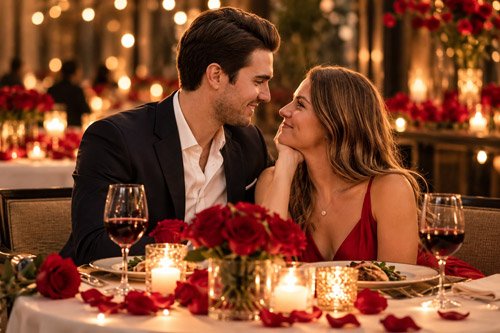
A classic candlelight dinner is perfect if you want an elegant and romantic Valentine’s Day portrait.
Copy the Prompt
Transform the uploaded couple photo into a realistic Valentine’s Day dinner portrait. Place the couple together at an intimate restaurant table decorated with red roses, small candles and elegant dinnerware. Keep both people recognizable and preserve their natural facial features. Give them stylish evening outfits that look realistic and sophisticated. Show them sitting close together with relaxed expressions and natural affectionate body language. Use warm candlelight, soft background bokeh and realistic skin texture. Create the image like a professional romantic lifestyle photograph with an elegant Valentine’s Day atmosphere. Use a vertical 4:5 composition.
Best For
- Valentine’s Day Instagram posts
- Facebook posts
- Romantic greeting cards
- Couple portraits
2. Valentine’s Day Sunset Walk
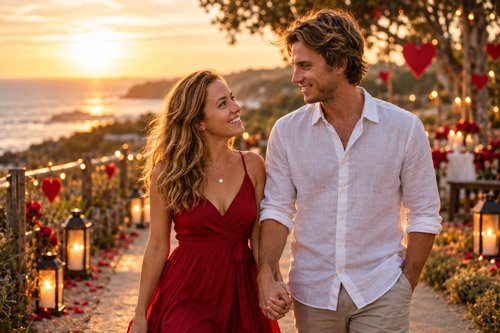
If you prefer something natural rather than a formal photoshoot, a sunset walk can create a beautiful candid-style image.
Copy the Prompt
Create a realistic Valentine’s Day couple photograph using the uploaded image as the reference. Show the couple walking hand in hand along a peaceful path during golden hour. Keep their faces, hair and overall appearance natural and recognizable. Add subtle Valentine’s Day details such as a few heart-shaped decorations in the distant background without making the scene look artificial. Show the couple smiling naturally and looking at each other while walking. Use warm golden sunlight, realistic shadows, natural skin texture and a softly blurred background. The result should look like a candid professional photograph rather than a heavily edited AI image.
Best For
- Couple profile photos
- Romantic Valentine’s Day posts
3. Valentine’s Day Rose Garden
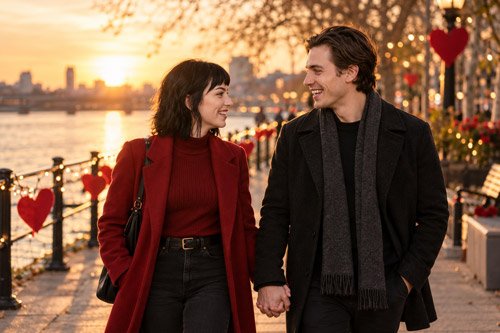
Flowers are closely associated with Valentine’s Day, making a rose garden a natural choice for a romantic couple image.
Copy the Prompt
Create a romantic Valentine’s Day couple portrait using the uploaded photo as the reference. Place the couple together in a beautiful rose garden filled with red, pink and soft white roses. Keep their facial characteristics recognizable and natural. Show the couple standing close together while one partner gently holds a rose. Give them elegant but realistic outfits that complement the garden. Use soft morning light, natural colors, shallow depth of field and realistic photography details. The final image should feel romantic and sophisticated without looking overly artificial. Use a vertical portrait composition.
Best For
- Valentine’s Day cards
- Romantic photo gifts
4. Cozy Valentine’s Day Coffee Date
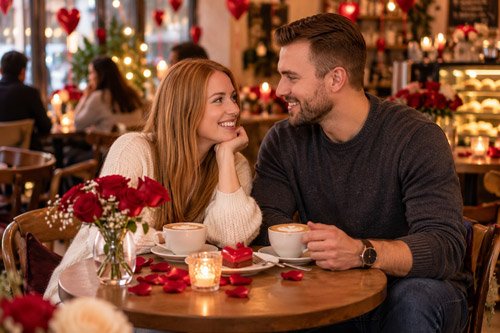
For something simple and modern, turn an everyday coffee date into a warm Valentine’s Day moment.
Copy the Prompt
Using the uploaded couple photo as the reference, create a realistic Valentine’s Day coffee date scene. Place the couple sitting together at a cozy modern café with two cups of coffee on the table and subtle Valentine’s Day decorations in the background. Add a small vase of roses and warm ambient lighting. Keep both people recognizable and preserve their natural facial features. Show them having a relaxed conversation and smiling naturally rather than posing directly at the camera. Use realistic lifestyle photography, soft background blur and warm neutral colors. The final image should feel like a genuine Valentine’s Day date.
Best For
- Casual Valentine’s Day posts
- Couple memories
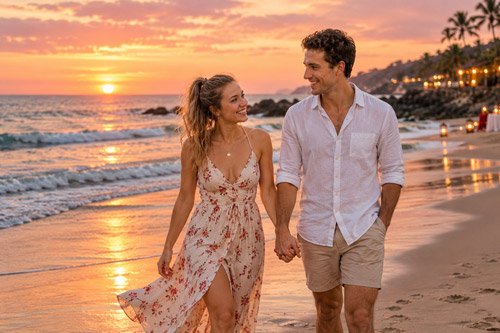
5. Valentine’s Day Beach Date
If you want a more adventurous Valentine’s Day image, try a romantic beach setting.
Copy the Prompt
Transform the uploaded couple photo into a romantic Valentine’s Day beach portrait. Show the couple walking barefoot together along a quiet beach near sunset, holding hands and smiling at each other. Keep their facial features, hair and overall appearance recognizable. Dress them in stylish casual beach outfits appropriate for a warm evening. Add gentle ocean waves, a soft pink and orange sunset sky and natural reflections on the water. Use realistic golden-hour photography, natural skin texture and subtle depth of field. Keep the Valentine’s Day feeling romantic but understated and realistic.
Best For
- Travel-loving couples
- Romantic social media posts
6. Valentine’s Day Rooftop Date
A city rooftop can give your Valentine’s Day photo a stylish and modern look.
Copy the Prompt
Create a sophisticated Valentine’s Day couple portrait using the uploaded photo as a reference. Place the couple on an elegant city rooftop during blue hour, with a beautiful city skyline and soft lights in the background. Add a small romantic dinner table decorated with candles and a few red roses. Keep both people recognizable and maintain their natural facial features. Dress them in stylish evening outfits. Show relaxed and affectionate body language. Use cinematic city lighting, realistic skin texture, natural proportions and a soft background blur. The final photograph should feel modern, romantic and premium without excessive visual effects.
Best For
- Modern couple portraits
- Digital Valentine’s Day cards
7. Valentine’s Day Picnic
A picnic can make your Valentine’s Day image feel relaxed, playful and personal.
Copy the Prompt
Create a natural Valentine’s Day lifestyle photograph using the uploaded couple photo as the reference. Show the couple enjoying a romantic picnic together in a green park. Add a picnic blanket, a small basket, strawberries, flowers and a simple dessert. Include subtle Valentine’s Day decorations without making the scene look overly themed. Keep both people recognizable and preserve their natural facial features. Show them laughing and enjoying a genuine moment together. Use soft afternoon sunlight, realistic greenery, natural colors and a shallow depth of field. Make the photograph feel candid, warm and authentic.
Best For
- Casual Valentine’s Day posts
8. Valentine’s Day Movie Night at Home
For couples who prefer staying home, create a cozy movie-night scene instead.
Copy the Prompt
Using the uploaded couple photo as a reference, create a cozy Valentine’s Day movie-night scene at home. Show the couple sitting comfortably together on a sofa with soft blankets, popcorn, drinks and a few subtle Valentine’s Day decorations around the room. Add warm ambient lighting from lamps and soft decorative lights. Keep their facial features recognizable and natural. Show them smiling and enjoying the evening together rather than looking directly at the camera. Use realistic home details, natural skin texture and lifestyle photography. The overall mood should feel intimate, comfortable and genuine.
Best For
- At-home couples
- Personal Valentine’s Day memories
9. Elegant Valentine’s Day Portrait
If you want something that looks more like a professional studio portrait, this elegant style is worth trying.
Copy the Prompt
Create a sophisticated Valentine’s Day couple portrait using the uploaded photo as the reference. Place the couple against an elegant dark background with subtle warm lighting and a few out-of-focus roses. Dress them in timeless formal outfits that complement each other. Keep both people recognizable and preserve their natural facial features and skin texture. Use a relaxed pose with subtle affectionate body language. Create soft studio-style lighting, realistic shadows and a shallow depth of field. The final image should look like a professionally photographed romantic portrait rather than an overly edited AI image.
Best For
- Profile photos
- Framed portraits
- Valentine’s Day cards
- Social media
10. Dreamy Valentine’s Day Night Portrait
For something more creative, try a dreamy evening scene with city lights and a romantic atmosphere.
Copy the Prompt
Transform the uploaded couple photo into a dreamy Valentine’s Day night portrait. Place the couple together on a quiet city street surrounded by warm decorative lights and subtle heart-shaped bokeh in the distant background. Keep both people recognizable and preserve their natural facial features, hair and overall appearance. Show them standing close together and looking at each other with relaxed, genuine expressions. Use cinematic night photography, warm street lighting, realistic shadows, natural skin texture and shallow depth of field. Keep the heart-shaped lights subtle and tasteful so the image feels romantic rather than artificial.
Best For
- Romantic Instagram posts
- Valentine’s Day profile pictures
- Digital greeting cards
How to Make Your Valentine’s Day AI Photos Look More Natural
Sometimes an AI-generated couple image can look too perfect or overly staged. Small changes to your prompt can make a big difference.
Ask for Natural Expressions
Add phrases such as:
Natural facial expressions, relaxed body language and a genuine candid moment.
This can help create a less posed-looking photograph.
Describe What the Couple Is Doing
Instead of simply asking for a couple standing together, describe an action:
The couple is walking hand in hand while talking and smiling at each other.
Actions often make a scene feel more natural.
Avoid Too Many Decorations
Valentine’s Day images don’t need hearts, roses and red decorations everywhere. A few subtle details can make the image feel more realistic.
For example:
Add a small vase of roses on the table and keep the rest of the background simple.
Keep the Original People Consistent
If you’re editing an existing photograph, tell Gemini clearly what should remain unchanged.
Keep the couple’s facial features, hair and overall appearance consistent with the uploaded reference photo. Change only the background, lighting and clothing.
How to Customize These Valentine’s Day Prompts
You don’t have to use the prompts exactly as written. Changing just a few details can create a completely different image.
Change the Location
- Beach
- Rose garden
- Cozy café
- Rooftop restaurant
- City street
- Mountain cabin
- Home
- Park
Change the Mood
- Romantic
- Playful
- Elegant
- Cozy
- Dreamy
- Cinematic
- Casual
Change the Lighting
- Golden-hour sunlight
- Soft morning light
- Candlelight
- Warm restaurant lighting
- City lights
- Soft studio lighting
Change the Clothing
- Casual everyday clothes
- Elegant evening outfits
- Winter outfits
- Smart casual clothing
- Traditional clothing
- Beach outfits
Try changing one or two elements at a time. This makes it easier to see which changes improve the result.
Want to Add a Valentine’s Day Message?
If you want to turn your AI image into a greeting card, ask Gemini to leave some empty space for text.
For example:
Leave clean, uncluttered space at the top of the image for a Valentine’s Day message. Do not generate any text in the image.
You can then add your own message using an image editor.
Valentine’s Day Message Ideas
- Happy Valentine’s Day, My Love
- Forever Looks Good on Us
- You Are My Favorite Person
- Every Day Feels Better With You
- Love, Laughter and Us
- My Valentine, Today and Always
Best Image Sizes for Valentine’s Day Photos
The ideal image ratio depends on where you want to share your Valentine’s Day creation.
| Use | Suggested Ratio |
|---|---|
| Instagram Feed | 4:5 |
| Instagram Story | 9:16 |
| 2:3 | |
| 1:1 or 4:5 | |
| Website Featured Image | 16:9 |
| Digital Greeting Card | 4:5 or 5:7 |
For social media portraits, a vertical composition usually gives you enough room to show the couple while still keeping the background visible.
What If Gemini Changes the Couple’s Face?
AI image editing may not reproduce someone’s appearance perfectly every time. If the result doesn’t look enough like the original people, start with a clearer reference photo and give Gemini a more specific instruction.
Try:
Use the uploaded photograph as the primary identity reference. Preserve the couple’s facial characteristics, hairstyle and overall appearance. Make the people look natural and consistent with the reference image. Change only the environment, clothing and lighting.
If the result is close but not quite right, make smaller adjustments instead of regenerating the entire scene.
When using photos of other people, make sure you have the appropriate permission to use their images.
Can You Use These Prompts With Other AI Image Tools?
Yes. The ideas in these prompts aren’t limited to one image-generation tool. You can adapt the descriptions for other AI image generators and editors.
However, different AI models may interpret the same wording differently. If one tool gives you a result you don’t like, experiment with shorter instructions, more specific descriptions or a different image style.
Final Thoughts
Valentine’s Day doesn’t have to mean using the same heart-filled template everyone else is sharing. With the right prompt, you can create an image that feels much more personal to your relationship.
Start with one of the ideas above and change the details that matter to you. Maybe it’s a favorite café, a beach you visited together, a quiet evening at home or simply a sunset walk holding hands.
The goal isn’t to create the most complicated AI image. It’s to create something that feels like your story.
Try a few different prompts, keep the versions you like and add your own Valentine’s Day message afterward to turn the image into a personal digital greeting.
Frequently Asked Questions
Q1. Can I use these Gemini prompts with my own couple photo?
Yes. If the Gemini feature you’re using supports image editing or reference images, you can upload an appropriate couple photo and use these prompts to guide the transformation.
Q2. Can I change the background in these Valentine’s Day prompts?
Yes. You can replace the suggested location with a beach, restaurant, garden, café, home, city street or any other setting you prefer.
Q3. How can I make a Valentine’s Day AI photo look realistic?
Use a clear reference photo and ask for natural facial features, realistic skin texture, natural body language and believable lighting. Avoid filling the prompt with too many unnecessary visual effects.
Q4. What is the best image size for Instagram?
A vertical 4:5 composition is a useful choice for Instagram feed posts. If you’re creating a Story, a 9:16 format is more appropriate.
Q5. Can I add Valentine’s Day text to the AI image?
Yes. You can ask Gemini to leave some empty space for your message and add the final text afterward using an image editing application.
Q6. Can I use these prompts for a Valentine’s Day greeting card?
Yes. A 4:5 or 5:7 portrait composition can work well for a digital greeting card. You can leave some open space for your own Valentine’s Day message.
Q7. Can I use these prompts with other AI image generators?
Yes. The concepts can be adapted for other AI image tools. You may need to change the wording depending on how the particular tool handles image prompts and reference photos.
Last updated: October 2026