What You’ll Find in This Guide
- 10 detailed AI prompts for engagement announcement photos
- Romantic, elegant, casual, outdoor, and creative photo ideas
- Prompts for showing the engagement ring naturally
- Ideas for proposal and save-the-date announcements
- Tips for creating more realistic-looking couple portraits
- Recommended image sizes for social media
- Tips for adding text such as “We’re Engaged!”
- Simple ways to customize each prompt
- Solutions for common AI image problems
The prompts below are starting points. You can change the clothing, location, season, lighting, colors, poses, and mood to create something that feels more personal.
How to Use These AI Prompts for Engagement Photos
Copy one of the prompts below and paste it into your preferred AI image generator. If the tool allows you to upload a reference photo, you can use a photo of the couple to help create a more personalized result.
For the most natural-looking result, describe the important visual details rather than simply asking for a “beautiful engagement photo.” Mention the setting, lighting, clothing, mood, composition, camera style, and the way the couple should interact.
If you’re using someone else’s photograph as a reference, make sure you have permission to use it.
Tip: AI-generated text inside images can sometimes contain spelling or lettering errors. For announcements containing an exact message, it is often easier to generate the photograph first and add the final text afterward using your preferred image editor.
1. Romantic Engagement Portrait
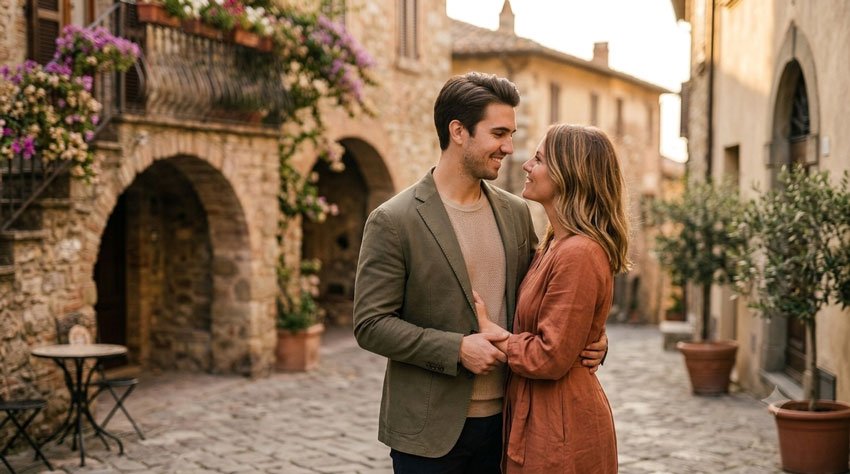
A classic engagement portrait is a simple choice when you want the couple to be the focus. Soft lighting, natural expressions, and a romantic background can create an image that works well for a social media announcement.
Copy the Prompt
Create a romantic engagement announcement portrait of a happy young couple standing close together in a beautiful outdoor garden. They are smiling naturally and looking genuinely happy, with the engagement ring subtly visible on the woman’s hand. Use soft golden-hour lighting, delicate flowers and greenery in the background, realistic skin texture, natural facial expressions, elegant but comfortable clothing, shallow depth of field, professional portrait photography, warm romantic atmosphere, realistic proportions, authentic candid emotion, high detail, and a sophisticated timeless look. Compose the image vertically with enough clean space around the couple for an engagement announcement.
Best For: Instagram announcements, Facebook posts, engagement cards, and Pinterest graphics.
2. Engagement Ring Announcement Photo
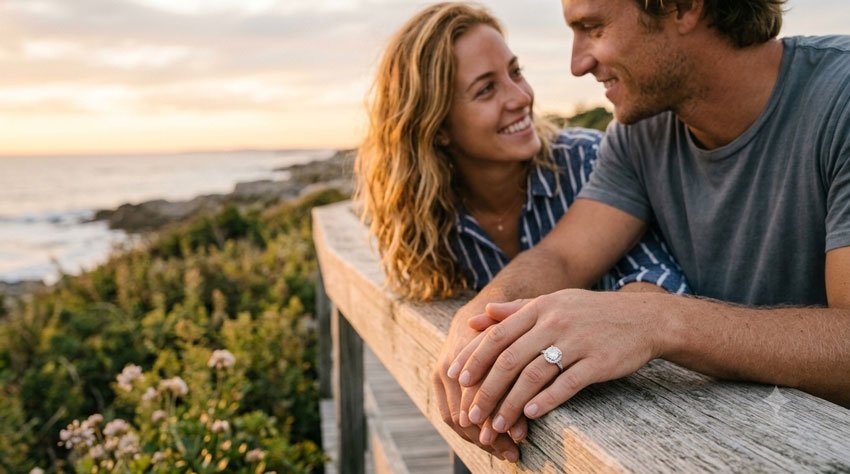
If you want the engagement ring to be the main focus, try a close-up composition. This style can work particularly well for an announcement where the ring itself tells the story.
Copy the Prompt
Create an elegant engagement announcement photograph focused on a newly engaged woman’s hand resting naturally beside her partner’s hand. Feature a beautiful engagement ring prominently but realistically, with realistic metal reflections and a detailed gemstone. Include a softly blurred romantic background with warm evening light, subtle flowers, and hints of the couple in the background. Keep the hands anatomically natural with realistic fingers and nails. Use luxury editorial photography, soft natural lighting, realistic textures, shallow depth of field, sophisticated composition, and a warm celebratory mood. Leave some uncluttered space for adding announcement text later.
Best For: Ring reveals, “She Said Yes!” posts, Instagram Stories, and announcement graphics.
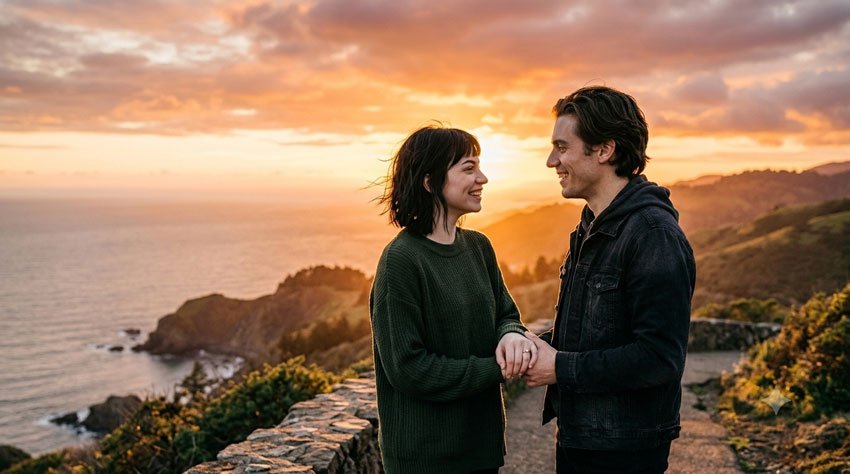
3. Sunset Engagement Announcement
Sunset photography gives an engagement announcement a warm and emotional feeling. This prompt focuses on the couple while using the sunset as a dramatic background.
Copy the Prompt
Create a cinematic engagement announcement photo of a newly engaged couple standing together during a beautiful sunset. The couple is holding hands and smiling naturally while looking at each other with genuine happiness. The engagement ring is subtly visible. Use a warm golden sky, soft clouds, gentle sunlight around their silhouettes, and a beautiful outdoor landscape in the background. Capture realistic facial expressions, natural body language, authentic skin texture, detailed clothing, soft wind movement, and professional photography. Use warm cinematic lighting without making the image look artificial. Vertical composition with balanced negative space for announcement text.
Best For: Romantic social media announcements and save-the-date inspiration.
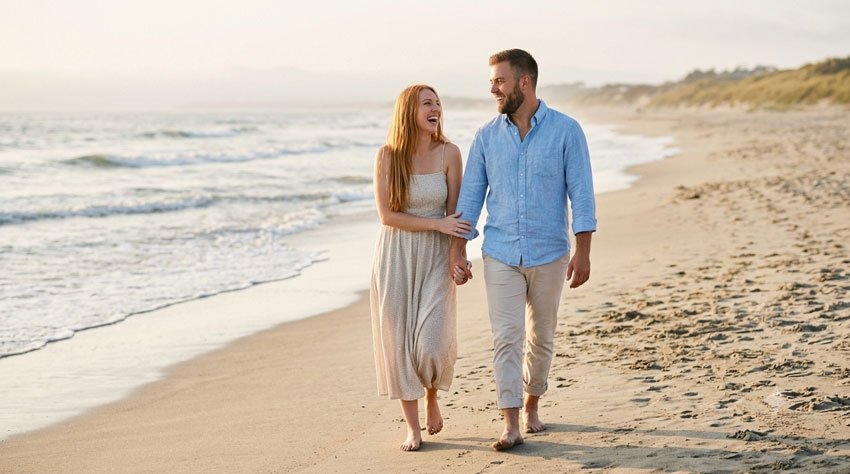
4. Beach Engagement Announcement
For couples who love the ocean, a beach engagement scene can create a relaxed and memorable announcement. You can also change the location to a beach that has personal meaning to you.
Copy the Prompt
Create a realistic romantic engagement announcement photo of a newly engaged couple walking barefoot along a beautiful beach. They are holding hands and laughing naturally while looking at each other. The engagement ring should be subtly visible. Include gentle ocean waves, soft evening sunlight, a natural sandy shoreline, and a peaceful coastal atmosphere. Dress the couple in stylish but relaxed light-colored outfits suitable for a beach engagement portrait. Use realistic skin texture, natural facial expressions, authentic body language, soft cinematic lighting, shallow depth of field, and professional lifestyle photography. Create a vertical composition with a clean area for adding text.
Best For: Beach-loving couples, destination engagement announcements, and summer posts.
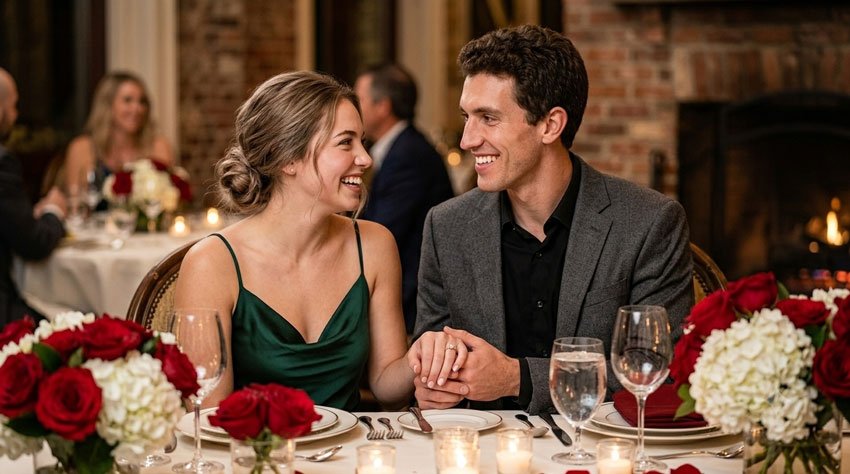
5. Elegant Engagement Dinner
An elegant dinner scene can make the announcement feel sophisticated without looking overly staged. This idea works particularly well for couples who prefer a polished style.
Copy the Prompt
Create a sophisticated engagement announcement photograph of a newly engaged couple celebrating at an elegant restaurant dinner. They are seated close together at a beautifully decorated table with candles, flowers, elegant dinnerware, and warm ambient lighting. The couple is smiling naturally and sharing a genuine moment of happiness. The engagement ring should be visible but not exaggerated. Dress them in stylish evening outfits suitable for a romantic celebration. Use realistic skin texture, natural expressions, authentic body language, warm restaurant lighting, shallow depth of field, professional editorial photography, and a refined romantic atmosphere. Leave subtle negative space for adding an engagement announcement message.
Best For: Elegant engagement announcements, formal social posts, and digital invitations.
6. Proposal Recreation Photo
If you want to recreate the moment of the proposal, you can describe the scene as a romantic storytelling photograph. This can be especially meaningful when the original proposal happened quickly and you didn’t get a good photograph of the moment.
Copy the Prompt
Create a realistic romantic proposal recreation photograph showing a couple at a beautiful outdoor location. One partner is kneeling while presenting an engagement ring, and the other partner is reacting with genuine surprise and happiness. Capture the emotional moment naturally rather than making it look staged. Use a scenic garden with soft flowers and greenery, warm golden-hour sunlight, realistic facial expressions, natural body language, detailed clothing, authentic skin texture, and professional documentary-style photography. Include subtle background blur and cinematic depth of field. Make the image feel like a real candid photograph taken during a meaningful proposal.
Best For: Proposal stories, engagement announcements, and recreating a special memory.
7. Close-Up Couple and Ring Portrait
Sometimes you don’t need a complicated background. A close-up portrait can put the couple’s expressions and engagement ring at the center of the announcement.
Copy the Prompt
Create a realistic close-up engagement portrait of a newly engaged couple standing closely together and smiling naturally. The woman’s hand is gently resting near her partner’s shoulder so the engagement ring is visible in a natural way. Focus on authentic facial expressions, realistic skin texture, detailed eyes, natural hair, accurate hands and fingers, and genuine emotion. Use soft natural window light, a neutral elegant background, shallow depth of field, professional portrait photography, and subtle warm tones. Avoid excessive retouching or artificial beauty filters. Create a vertical high-resolution composition suitable for an engagement announcement.
Best For: Instagram posts, profile announcements, and minimalist engagement graphics.
8. Floral Engagement Announcement
Flowers can instantly give an engagement announcement a celebratory feeling. This prompt uses floral elements without allowing them to overpower the couple.
Copy the Prompt
Create a romantic engagement announcement portrait of a newly engaged couple surrounded by elegant seasonal flowers. The couple is standing close together with relaxed natural smiles and affectionate body language. Include tasteful floral arrangements in the foreground and background without covering their faces. Make the engagement ring subtly visible. Use soft diffused daylight, realistic flower textures, natural skin tones, authentic expressions, elegant clothing, shallow depth of field, and professional wedding-editorial photography. Keep the composition sophisticated, bright, and romantic with enough uncluttered space for an announcement message.
Best For: Spring or summer engagement announcements, wedding-related Pinterest posts, and romantic cards.
9. Casual Outdoor Engagement Photo
Not every engagement announcement needs to look formal. If you prefer something natural and relaxed, try a lifestyle-style outdoor portrait.
Copy the Prompt
Create a natural lifestyle engagement announcement photograph of a newly engaged couple walking together through a beautiful city park. They are laughing and talking naturally while holding hands, with the engagement ring subtly visible. Dress them in stylish casual outfits that coordinate without looking overly matched. Use soft morning or late-afternoon light, realistic trees and greenery, natural movement, authentic facial expressions, realistic skin texture, and candid professional photography. Avoid stiff poses and excessive retouching. Make the photograph feel like a genuine moment captured during an engagement photo session.
Best For: Casual couples, lifestyle announcements, Facebook posts, and personal blogs.
10. Save-the-Date Engagement Announcement
If you’re planning to turn the engagement image into a save-the-date announcement, create the photograph with clear negative space. This makes it easier to add the wedding date and other information afterward.
Copy the Prompt
Create an elegant save-the-date engagement announcement photograph featuring a happy newly engaged couple standing together in a beautiful romantic outdoor setting. The couple should have natural smiles and affectionate but relaxed body language, with the engagement ring subtly visible. Use soft golden-hour lighting, tasteful flowers and greenery, elegant coordinated outfits, realistic skin texture, natural facial expressions, professional wedding photography, shallow depth of field, and a timeless romantic atmosphere. Position the couple slightly to one side of the frame and leave a large clean area of soft background on the opposite side for adding text such as “We’re Engaged!” and a wedding date later. Keep the design sophisticated and uncluttered.
Best For: Save-the-date graphics, wedding announcement cards, Pinterest images, and social media posts.
How to Make AI Engagement Photos Look More Natural
One of the biggest differences between a generic AI image and a convincing engagement portrait is the amount of visual detail in the prompt.
Instead of simply writing “Create a beautiful engagement photo,” describe the scene you actually want.
Include These Details
- Location: beach, garden, city, restaurant, park, home, or another meaningful place.
- Lighting: golden hour, soft daylight, window light, candlelight, or overcast light.
- Clothing: casual, formal, elegant, seasonal, or coordinated outfits.
- Emotion: joyful, intimate, relaxed, surprised, playful, or celebratory.
- Composition: close-up portrait, full-body image, couple on one side, or centered portrait.
- Photography style: lifestyle photography, editorial portrait, documentary photography, or cinematic photography.
- Background: describe whether it should be detailed, softly blurred, or minimal.
Most importantly, avoid filling every part of the prompt with unnecessary adjectives. Focus on details that actually change the resulting image.
How to Add “We’re Engaged!” to Your Image
AI image generators can attempt to create text inside an image, but lettering can sometimes appear distorted or misspelled. For an announcement that needs exact wording, adding the text afterward gives you more control.
Some simple announcement ideas include:
- We’re Engaged!
- She Said Yes!
- He Asked. I Said Yes.
- Forever Starts Now
- We Said Yes to Forever
- The Beginning of Forever
- Our Next Chapter Begins
- Engaged & So Happy
You can add your engagement date, names, or wedding date underneath the main message. Keep the typography simple enough that the photograph remains the main focus.
Tip: If your image already has a clean area of background, place the announcement there rather than covering the couple or engagement ring.
Best Image Sizes for Engagement Announcements
The ideal dimensions depend on where you plan to use the image. A vertical image is particularly useful because it can work well for mobile-first platforms and can be cropped into several formats.
| Use | Recommended Shape | Suggested Size |
|---|---|---|
| Instagram portrait | 4:5 | 1080 × 1350 px |
| Instagram Story | 9:16 | 1080 × 1920 px |
| 2:3 | 1000 × 1500 px | |
| Facebook post | 4:5 or 1:1 | 1080 × 1350 px or 1080 × 1080 px |
| Digital announcement card | 4:5 or 5:7 | 1200 × 1500 px or similar |
For your original website images, a high-resolution vertical format such as 1200 × 1500 pixels is a practical starting point. You can create smaller versions for social platforms afterward.
How to Customize These Engagement Prompts
The prompts above are intentionally flexible. You can make them much more personal by replacing generic details with elements that reflect the couple.
1. Change the Location
Instead of a generic garden, try a location that has meaning to you, such as the city where you met, a favorite park, a mountain destination, or a beach where you took your first vacation together.
2. Change the Season
Add seasonal details such as autumn leaves, spring blossoms, summer sunlight, or a cozy winter setting.
3. Change the Clothing
Describe the style you want, such as formal evening clothing, smart casual outfits, traditional clothing, or relaxed weekend clothes.
4. Change the Mood
Try words such as joyful, intimate, playful, elegant, cinematic, or candid depending on the feeling you want.
5. Leave Space for Text
If the image will become an announcement card, tell the AI to leave clean negative space on one side of the composition. You can then add your message afterward.
Common AI Engagement Photo Problems
The Hands Look Strange
Hands and fingers can sometimes be difficult for AI image generators. Try asking for natural hands, anatomically correct fingers, realistic nails, and accurate proportions. You can also regenerate the image rather than trying to fix a single imperfect result.
The Faces Don’t Look Natural
Use descriptions such as natural facial expressions, realistic skin texture, authentic emotion, subtle retouching, and candid photography. Avoid asking for excessive beauty filters or unrealistic perfection.
The Engagement Ring Looks Wrong
Describe the ring clearly and ask for realistic proportions and natural reflections. If the ring is important to the announcement, generate several versions and select the one with the most convincing result.
The Couple Looks Too Posed
Use phrases such as candid moment, natural body language, genuine laughter, relaxed posture, and documentary-style photography.
The Text Is Misspelled
Instead of asking the AI to generate a long sentence inside the image, create the photograph without text and add your final announcement wording afterward.
A Simple Formula for Better Engagement Photo Prompts
If you want to create your own prompts, this simple structure can help:
Subject + Location + Pose + Clothing + Lighting + Emotion + Photography Style + Composition + Important Details
For example:
Create a realistic engagement portrait of a newly engaged couple + standing together in a botanical garden + holding hands and smiling naturally + wearing elegant casual outfits + photographed during golden hour + showing genuine happiness + professional lifestyle photography + vertical 4:5 composition + engagement ring subtly visible + clean background space for announcement text.
You don’t need to follow the formula word-for-word. Think of it as a checklist that helps you include the details that matter.
Tips for Using Reference Photos
If your AI image tool supports reference images, you can use a suitable photograph of the couple as a starting point. This can be useful when you want the generated image to resemble the people in the original photograph more closely.
However, AI image generation may not reproduce every facial feature, hairstyle, item of clothing, or accessory exactly. Treat the result as a creative interpretation rather than a guaranteed duplicate of the original photograph.
For privacy and consent, only upload photographs that you have the right to use, particularly when other people are visible in the image.
Frequently Asked Questions
Q1. Can I use these prompts with Gemini?
Yes. These prompts are written as general image-generation instructions and can be adapted for Gemini or other AI image tools that support image generation. The exact features and interface available to you can vary depending on the product, account, and region.
Q2. Can I use my own engagement photos as a reference?
If your chosen AI tool supports reference images, you can generally use a suitable photograph as part of your creative workflow. Make sure you have permission to use any photograph containing another person.
Q3. How can I make an AI engagement photo look more realistic?
Describe realistic lighting, natural facial expressions, authentic body language, realistic skin texture, accurate hands, and professional photography. Avoid excessive beauty filters and overly perfect poses.
Q4. Can AI create the “We’re Engaged!” text in the image?
Some image-generation tools can attempt to create text, but results can vary. If the wording needs to be exact, adding the text after generating the photograph is usually easier to control.
Q5. What size should I use for an engagement announcement?
A vertical 4:5 image around 1080 × 1350 pixels works well for many social media posts. For a website or high-resolution original, you can create a larger version such as 1200 × 1500 pixels and resize it when needed.
Q6. Can I change the location in these prompts?
Absolutely. Replacing the generic location with a meaningful place can make the image feel much more personal. You can use a favorite restaurant, park, beach, city, garden, or another location connected to the couple.
Q7. Can I use these images for wedding invitations?
You can adapt the visual concepts for wedding-related designs, but check the terms of the AI image tool you use and any applicable licensing requirements before using generated images commercially or for printed materials.
Final Thoughts
An engagement announcement doesn’t have to follow a single style. You can create something romantic and traditional, casual and candid, elegant and polished, or completely personal to your relationship.
The prompts in this guide are designed to give you a starting point. Experiment with different locations, lighting, outfits, compositions, and moods until you find a result that feels right for the announcement you have in mind.
If you want the final image to look more authentic, focus less on adding lots of decorative details and more on natural expressions, realistic lighting, believable body language, and a setting that tells part of the couple’s story.
And when the announcement includes important wording, consider creating the photograph first and adding the final text afterward. That gives you much more control over the finished design.
Last updated: September 2026