
If you plan to edit an existing baby photo, start with a clear image and use the prompt to describe the changes you want. AI-generated results can vary, so you may need to adjust the instructions to get the look you have in mind.
How to Use These Gemini AI Baby Photo Prompts
You don’t need complicated photography equipment to experiment with these ideas. The basic process is straightforward.
- Open Google Gemini and select an image-generation or image-editing feature available to you.
- Upload a suitable baby photo if you want to edit an existing picture and the feature supports image uploads.
- Choose one of the prompts below and copy it.
- Paste the prompt into Gemini and generate the image.
- Check the result carefully, particularly the baby’s face, hands, clothing and overall appearance.
- If you want a different background or color, ask Gemini to change that element without unnecessarily altering the rest of the picture.
For example, if you like the result but want a softer background, you could ask:
Keep the baby’s appearance and natural position unchanged. Replace the background with a soft cream-colored studio backdrop and use gentle natural lighting.
Gemini’s available image features can vary by account, region and product version. You may see slightly different options when following these steps.
10 Gemini AI Prompts for Newborn Baby Photos
These ideas range from simple newborn portraits to seasonal pictures and family announcements. Use them as starting points, and customize the colors, background and style to suit your preferences.
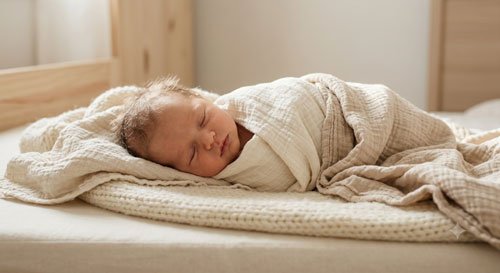
1. Cozy Newborn Baby Portrait
A simple, cozy portrait is a lovely choice if you prefer natural-looking baby photos without too many decorations. Soft neutral colors can help keep the focus on the baby’s face and tiny features.
Copy the Gemini Prompt
Create a natural and heartwarming newborn baby portrait using the uploaded baby photo as a reference. Keep the baby’s recognizable facial features, natural skin tone and age-appropriate proportions consistent with the reference. Show the baby comfortably resting on a firm, flat, safe surface with a soft neutral blanket arranged around the body. Use warm cream, beige and ivory colors, gentle window light and a simple uncluttered background. The overall style should resemble a timeless professional newborn photograph, with realistic skin texture and soft natural colors. Avoid excessive smoothing, artificial skin or exaggerated features. Create a vertical 4:5 portrait.
Best For
- Newborn photo albums
- Family keepsakes
- Baby announcement posts
- Personalized photo gifts
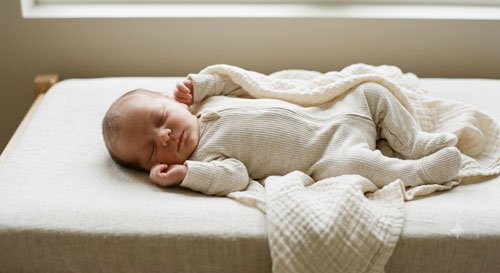
2. Sleeping Newborn Wrapped in a Soft Blanket
Sleeping baby portraits are popular because they capture the peaceful feeling of those early days. This prompt focuses on a soft, minimal setting rather than elaborate props or complicated poses.
Copy the Gemini Prompt
Create a peaceful newborn baby portrait using the uploaded photo as a reference. Show the baby sleeping naturally while comfortably supported on a firm, flat surface, dressed in a soft, age-appropriate cotton outfit. Add a lightweight blanket arranged around the baby without covering the face. Use warm ivory and pale beige tones, soft diffused light and a quiet, minimal background. Preserve the baby’s recognizable facial features and natural proportions. Keep the pose realistic and comfortable, with the head and neck naturally supported. The image should feel gentle, authentic and timeless, like a carefully taken newborn lifestyle photograph. Use a vertical portrait composition.
Best For
- Newborn memory albums
- Baby milestone collections
- Family photo books
- Personalized keepsakes
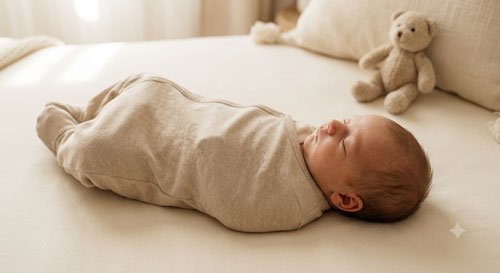
3. Newborn Baby With a Cute Teddy Bear
If you enjoy adorable nursery themes, try adding a small teddy bear to the scene. A simple stuffed toy can give the photo a playful touch without making the composition too busy.
Copy the Gemini Prompt
Create an adorable newborn baby portrait using the uploaded baby photo as the reference. Show the baby resting comfortably on a firm, flat surface in a soft neutral cotton outfit. Place a small, simple teddy bear nearby as a decorative element, positioned away from the baby’s face and body. Use a warm cream-colored background, gentle natural light and soft beige details. Preserve the baby’s recognizable face, natural skin tone and realistic proportions. Keep the scene uncluttered and photographically realistic, with the teddy bear serving as a subtle accent rather than the main subject. Create a vertical 4:5 image.
Best For
- Nursery-themed photo collections
- Baby announcement designs
- Personalized gifts
- Social media posts
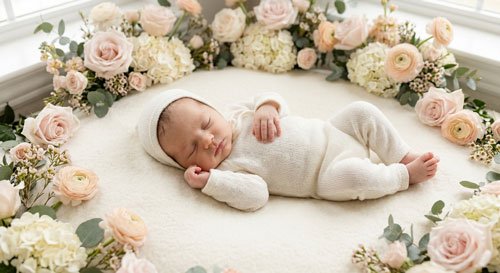
4. Newborn Baby Surrounded by Flowers
Floral newborn portraits have a soft, delicate look that works especially well for spring-themed designs. Pastel flowers and natural light can create an elegant background without overwhelming the photograph.
Copy the Gemini Prompt
Create a delicate newborn baby portrait using the uploaded image as a reference. Show the baby comfortably dressed in a soft ivory cotton outfit and resting on a firm, flat surface. Decorate the surrounding background with subtle pastel flowers in blush pink, pale peach and soft cream. Keep all flowers and decorative elements away from the baby’s face and body. Use gentle natural light, realistic skin texture and a clean, airy composition. Preserve the baby’s recognizable facial features and natural proportions. The finished image should look like a professional floral-themed newborn portrait, with realistic details and understated elegance. Use a vertical portrait layout.
Best For
- Spring baby announcements
- Floral-themed baby cards
- Photo albums
- Pinterest inspiration
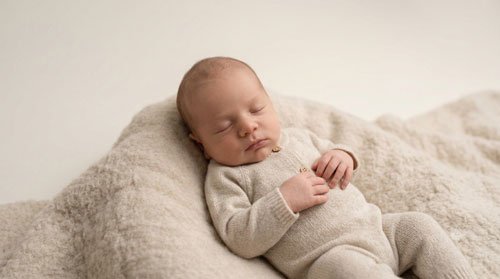
5. Minimalist Newborn Studio Portrait
Sometimes the simplest photographs are the most beautiful. A minimalist studio portrait uses a plain background, subtle lighting and very few decorative elements, making it ideal for parents who prefer a clean, modern look.
Copy the Gemini Prompt
Create a minimalist newborn baby studio portrait using the uploaded baby photo as the reference. Keep the baby’s facial features, natural skin tone and proportions consistent with the original. Show the baby in a comfortable, age-appropriate outfit against a simple warm-white or light beige background. Use soft, even studio lighting with natural shadows and realistic skin texture. Avoid unnecessary props, heavy filters, exaggerated expressions or artificial retouching. The composition should be clean and balanced, with the baby’s face as the main focus. Create a high-quality, realistic portrait in a vertical 4:5 format.
Best For
- Modern baby portraits
- Framed photographs
- Family albums
- Minimalist announcement cards
6. Newborn Baby With Parents
Your baby’s first family photo can become a meaningful keepsake. This prompt focuses on a close, affectionate family moment rather than a formal studio pose.
Copy the Gemini Prompt
Create a warm, realistic family portrait using the uploaded family or baby photo as a reference. Show both parents sitting comfortably together while gently holding their newborn with the baby’s head and neck properly supported. Keep each person’s recognizable facial features, natural skin tone and realistic proportions. Use simple neutral clothing, soft window light and a peaceful home background. Capture a genuine moment of affection with relaxed expressions and natural body language. Avoid overly posed smiles, excessive skin smoothing or dramatic effects. The final image should feel like an authentic family photograph taken during the baby’s first weeks. Use a vertical portrait composition.
Best For
- First family portraits
- Baby announcement cards
- Printed family albums
- Personal keepsakes
7. Newborn Baby in a Cozy Nursery
If you want a photograph that feels personal and homely, a nursery setting is a lovely option. Soft furnishings, muted colors and natural light can help create a warm atmosphere.
Copy the Gemini Prompt
Create a natural newborn lifestyle portrait using the uploaded baby photo as the reference. Show the baby comfortably dressed in a soft cotton outfit and resting on a safe, firm, flat surface under adult supervision. Set the scene in a peaceful nursery with muted cream walls, soft beige accents and gentle daylight coming through a window. Add a few simple nursery details in the background, such as a chair or a small shelf, without cluttering the scene. Preserve the baby’s recognizable features and natural proportions. Use realistic lighting and a calm, authentic photography style.
Best For
- Nursery-themed photo albums
- Newborn milestone collections
- Family keepsakes
- Personalized baby gifts
8. Newborn Baby in a Soft Knitted Outfit
Textures can make a newborn portrait feel warm and inviting. A soft knitted outfit, gentle colors and natural light can add detail without needing a complicated background.
Copy the Gemini Prompt
Create a cozy newborn baby portrait using the uploaded photo as the reference. Dress the baby in a soft, comfortable knitted outfit in a neutral color such as cream, oatmeal or pale gray. Show the baby in a natural, comfortable position on a firm, flat surface with appropriate support. Use gentle window light, a softly textured background and realistic fabric details. Preserve the baby’s natural facial features, skin tone and proportions. Avoid oversized accessories, tight wrapping or unnatural poses. The image should look like a warm, professional newborn lifestyle photograph with a simple and timeless style.
Best For
- Autumn and winter baby albums
- Cozy newborn portraits
- Family photo collections
- Personalized cards
9. Seasonal Newborn Baby Photo
Seasonal photos are a fun way to mark your baby’s first holiday or the time of year they were born. You can adapt this prompt for spring, summer, autumn or winter by changing the background colors and decorative details.
Copy the Gemini Prompt
Create a tasteful seasonal newborn baby portrait using the uploaded baby photo as a reference. Keep the baby’s recognizable facial features, natural skin tone and age-appropriate proportions. Dress the baby comfortably in a soft cotton outfit that suits the season. Use a simple background with subtle seasonal colors and a few decorative elements placed safely away from the baby. For an autumn theme, use warm beige, muted rust and soft brown; for spring, use pastel colors and delicate flowers; for winter, use cream and pale blue. Keep the scene realistic, uncluttered and naturally lit. Use a vertical 4:5 composition.
Best For
- First holiday photo collections
- Seasonal baby announcements
- Monthly milestone posts
- Family albums
10. Newborn Baby Announcement Photo
If you’re preparing a birth announcement for friends and family, this prompt can help you create a simple, elegant design. You can add the baby’s name and birth details afterward using an image editor.
Copy the Gemini Prompt
Create an elegant newborn baby announcement image using the uploaded baby photo as the main reference. Keep the baby’s facial features, natural skin tone and proportions consistent with the original. Place the baby in a simple, comfortable outfit against a soft cream background with subtle neutral decorations. Use gentle natural lighting and a clean, balanced composition. Leave a generous area of empty space at the top for the baby’s name and birth announcement. Do not generate any text, letters, numbers or watermarks in the image. Keep the result realistic, warm and suitable for a family announcement card. Use a vertical 4:5 layout.
Best For
- Birth announcements
- Digital greeting cards
- Family messages
- Personalized keepsakes
How to Make Newborn AI Photos Look More Natural
The most useful newborn prompts don’t rely on dozens of fancy descriptive words. They explain what the baby should look like, what the setting should be and which details should remain unchanged.
1. Start With a Clear Photo
If you’re editing an existing picture, choose a well-lit photo in which the baby’s face is visible. A clear reference gives the image model more information to work with, although it cannot guarantee an exact likeness.
2. Describe the Background Clearly
Instead of asking for a beautiful background, specify what you want. For example, try a plain cream backdrop, a softly lit nursery or a garden-inspired background with subtle pastel colors.
3. Keep the Lighting Simple
Soft window light, gentle daylight and even studio lighting are useful starting points for natural-looking portraits. Extremely dramatic lighting can make a baby image look less realistic.
4. Avoid Excessive Retouching
Newborn skin naturally has texture, tiny marks and variations in color. Ask for realistic skin texture instead of flawless, plastic-looking skin.
5. Make Small Changes
If the image is almost right, ask Gemini to adjust one detail at a time. You might change the background color or soften the lighting while asking it to preserve the baby’s appearance.
Newborn Photo Safety and Privacy Tips
AI-generated images can be creative, but newborn safety and privacy should come first when you work with real baby photos.
- Choose safe-looking poses: Use natural positions with appropriate head and neck support. Avoid prompts involving precarious props, suspended baskets, high surfaces or unsupported poses.
- Keep props away from the face: Decorative flowers, blankets and toys should not cover the baby’s nose or mouth.
- Do not recreate unsafe setups: Some professional newborn photographs combine multiple images or use adult support that is later edited out. Do not attempt an unsafe pose just to reproduce a picture.
- Protect personal information: Avoid including full birth dates, hospital details, home addresses or other private information in public images.
- Review the AI tool’s privacy settings: Before uploading a real baby’s photo, check the service’s current data and privacy terms and consider whether you are comfortable sharing the image.
- Get permission: If the photo belongs to someone else’s child, obtain permission before uploading or publishing it.
These prompts are intended for creating digital images. They are not a substitute for safe newborn handling or professional photography advice.
Best Image Sizes for Newborn Baby Photos
The best image ratio depends on where you want to share the finished photo. These are useful starting points for composing your image.
| Where You’ll Use It | Suggested Ratio |
|---|---|
| Instagram feed | 4:5 |
| Instagram Stories | 9:16 |
| Pinterest pins | 2:3 |
| Square social posts | 1:1 |
| Website featured images | 16:9 |
| Digital announcement cards | 4:5 or 5:7 |
For a newborn prompt article on a website, a vertical 4:5 image is a useful choice for showing the complete portrait. You can create a separate 16:9 crop for the featured image if your website theme uses a wide layout.
What If Gemini Changes the Baby’s Appearance?
When an AI model transforms a photo, it may alter facial details, hair, clothing or other features. If keeping the baby’s appearance consistent is important, make that instruction clear.
Try this follow-up instruction:
Use the uploaded photograph as the main reference. Preserve the baby’s recognizable facial features, natural skin tone, hair and age-appropriate proportions. Change only the background and lighting. Keep the pose natural and avoid artificial skin smoothing.
If the result still looks different, try a less dramatic edit. Changing the background while keeping the original photo mostly intact may produce a more recognizable result than requesting a completely new scene.
Always review the finished image carefully before printing or sharing it. AI-generated images can contain visual errors even when the prompt is detailed.
Frequently Asked Questions
Q1. Can I use Gemini to create newborn baby photos?
Yes. You can use Gemini’s available image-generation or image-editing features to explore newborn portrait ideas. The options available to you may depend on your account, region and the current product features.
Q2. Can I use these prompts with my baby’s existing photo?
Yes, if the image feature you’re using supports photo uploads and editing. Choose a clear reference image and specify which details you want to preserve.
Q3. Can I create newborn photos without uploading a real baby picture?
Yes. You can ask an image-generation tool to create a fictional newborn portrait using a text description. This can be useful for testing visual styles or making generic baby-themed designs.
Q4. Which prompt is best for a newborn announcement?
The newborn announcement prompt is a good starting point because it includes space for a name or message. You can add the final text in a separate editor to avoid misspelled letters in the generated image.
Q5. Can I use these prompts with other AI image generators?
Most of these ideas can be adapted to other image tools. You may need to change the wording or settings because different models interpret instructions differently.
Q6. How can I make a newborn AI photo look realistic?
Use a clear reference image, simple lighting, realistic skin texture and a natural pose. Avoid excessive effects, unrealistic proportions and overly complicated backgrounds. Always inspect the result for visual mistakes.
Q7. Is it safe to upload my baby’s photo to an AI tool?
Consider the service’s current privacy policy, data settings and image-handling terms before uploading a child’s photograph. Share only what you are comfortable providing, and avoid including unnecessary personal information.
Final Thoughts
Newborn photos are about preserving the little details that make the first weeks of a baby’s life so memorable. With these Gemini AI prompts, you can explore different styles, from a simple neutral portrait to a floral scene, a cozy nursery or a personalized announcement card.
Start with one idea that matches your taste. If you’re editing a real photograph, make small changes and check that the baby’s appearance remains natural. You can also experiment with background colors and lighting to create a consistent look across a collection of family photos.
Remember that AI images are creative interpretations, not perfect replacements for real-life photographs. Your original pictures remain valuable memories in their own right.
Save your favorite prompts and customize them to create a newborn photo style that feels special to your family.
Last updated: October 6, 2026