Graduation is one of those moments you want to remember for years. But getting professional graduation photos isn’t always easy, especially when you want different outfits, locations and styles.
What You’ll Find in This Guide
- 10 copy-and-paste Gemini graduation photo prompts
- Classic graduation portrait ideas
- Outdoor and campus graduation scenes
- Creative cap and gown photo ideas
- Tips for getting more realistic AI graduation photos
- Ideas for Instagram, Facebook and graduation announcements
- Recommended image sizes for social media
How to Use These Gemini Graduation Photo Prompts
For the most personal results, start with a clear photo of the graduate. A photo with a visible face, good lighting and minimal filters usually gives the image model more useful information.
- Open Google Gemini and use the image generation or editing feature available to you.
- Upload your graduation or portrait photo if you want to transform an existing image.
- Copy one of the prompts below.
- Paste the prompt into Gemini.
- Review the result carefully.
- Ask Gemini to make smaller changes if you want to adjust the background, clothing, lighting or pose.
For example, after generating an image, you could say:
Keep my face, hairstyle and graduation gown unchanged, but replace the background with a beautiful university campus during golden hour.
The exact image-generation and editing options available in Gemini can vary depending on the product, account and region.
10 Gemini AI Prompts for Graduation Photos
Each prompt below has a different purpose. You can use the prompts as written or change the location, outfit, colors, lighting and mood to create a graduation photo that feels more personal.
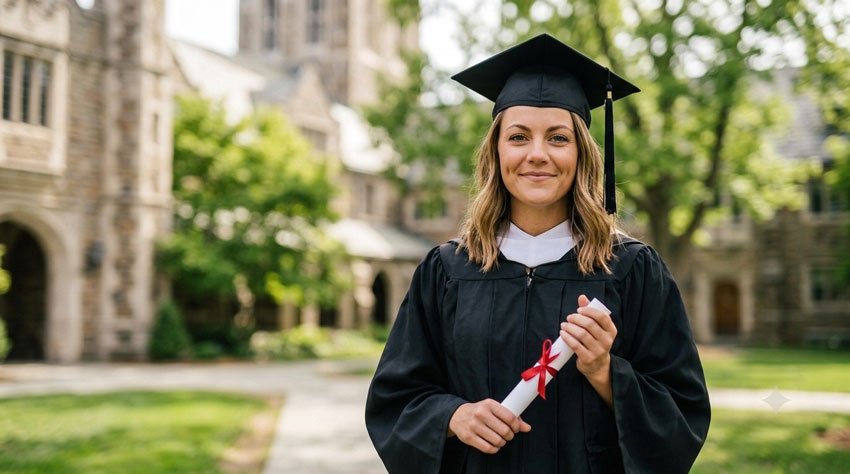
1. Classic Graduation Portrait
If you want a timeless graduation photo that looks like it was taken by a professional photographer, start with this prompt.
Copy the Prompt
Using the uploaded photo as the reference, create a realistic professional graduation portrait of the graduate wearing a traditional graduation cap and gown. Keep the person’s facial features, hairstyle, skin tone and overall appearance natural and recognizable. Place the graduate in a clean, elegant outdoor setting with soft natural lighting and a subtle blurred background. Give the person a confident but relaxed expression and natural posture. Use realistic skin texture, authentic photography details and professional portrait lighting. The final image should look like a genuine graduation photograph taken by a professional photographer. Use a vertical 4:5 composition.
Best For
- Graduation announcements
- Instagram posts
- Facebook posts
- Framed graduation portraits
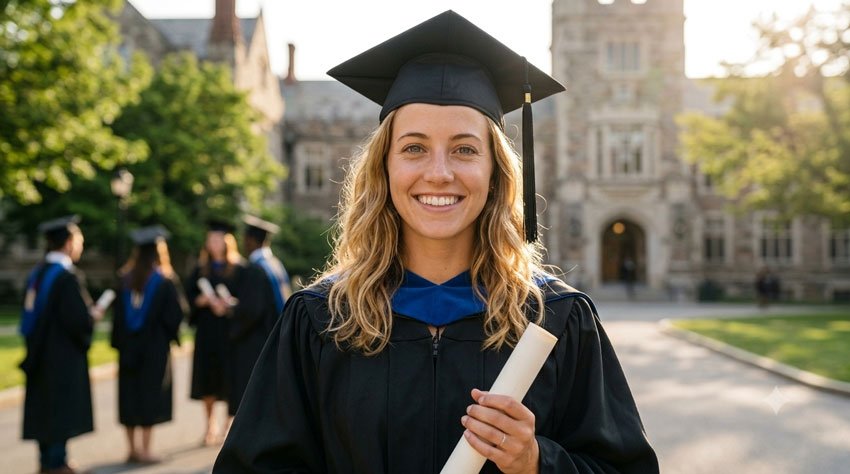
2. Graduation Photo on a University Campus
A campus background can make the graduation image feel more personal and connected to the school experience.
Copy the Prompt
Create a realistic graduation photograph using the uploaded person as the reference. Show the graduate wearing a traditional graduation cap and gown while standing on a beautiful university campus. Keep the person’s facial features, hairstyle and natural appearance consistent with the uploaded photo. Include realistic campus buildings, green trees and a subtle academic atmosphere in the background. Use soft afternoon sunlight and natural depth of field so the graduate remains the main focus. The pose should be confident but relaxed, with a genuine smile. Create a professional lifestyle photography look with realistic colors and a vertical 4:5 composition.
Best For
- College graduation posts
- University announcements
- Graduation memories
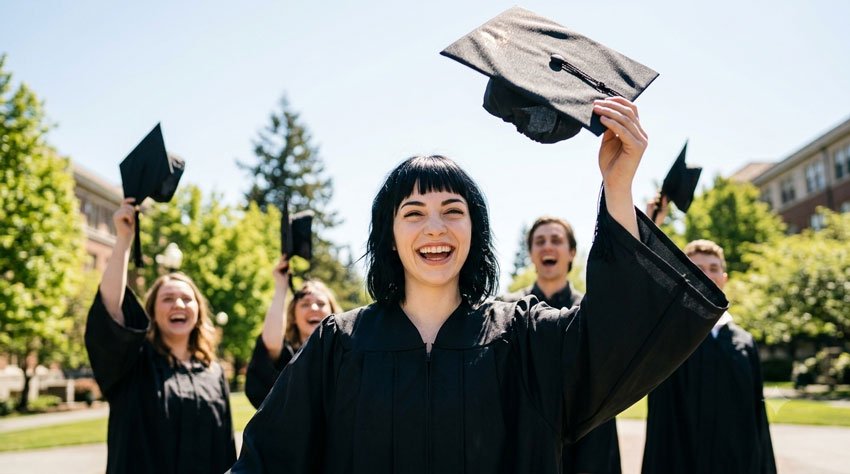
3. Throwing the Graduation Cap
Want something more energetic than a traditional portrait? Try a classic cap-throwing graduation moment.
Copy the Prompt
Create a joyful and realistic graduation celebration photograph using the uploaded graduate as the reference. Show the graduate wearing a traditional graduation gown and throwing their graduation cap into the air with a genuine happy expression. Keep the person’s facial features, hairstyle and appearance recognizable. Place them outdoors on a beautiful campus with trees and a softly blurred background. Capture the moment naturally with the cap above them and the gown moving slightly as they celebrate. Use bright natural daylight, realistic photography and a joyful atmosphere. Make the image look like a real candid graduation photograph. Use a vertical 4:5 composition.
Best For
- Celebration posts
- Graduation announcements
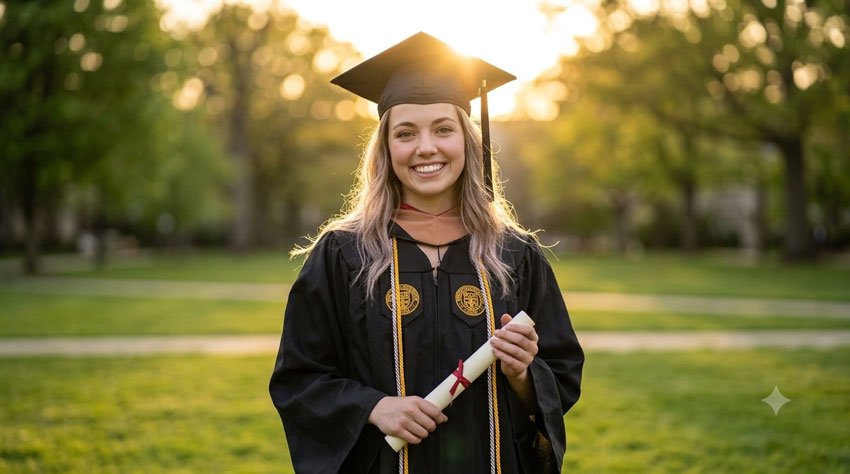
4. Golden Hour Graduation Photo
Golden-hour lighting can give a graduation portrait a warm and memorable feeling.
Copy the Prompt
Transform the uploaded photo into a beautiful golden-hour graduation portrait. Keep the graduate’s facial features, hairstyle, skin tone and overall appearance natural and recognizable. Dress the graduate in a realistic graduation cap and gown. Place them outdoors shortly before sunset with warm golden sunlight behind them and a softly blurred background. Add subtle natural lens flare and realistic light around the edges of the gown and hair. The expression should be confident, proud and natural. Create a cinematic but realistic professional photography style without excessive editing. Use a vertical 4:5 composition.
Best For
- Instagram portraits
- Graduation announcements
- Photo albums
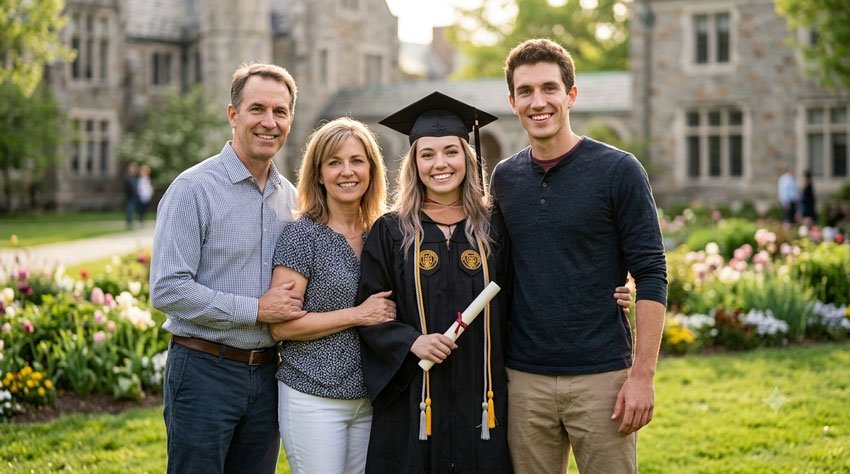
5. Graduation Photo With Family
Graduation is often a family celebration. This prompt can help create a warm family portrait around the special occasion.
Copy the Prompt
Create a realistic family graduation celebration photograph using the uploaded photos as references. Show the graduate wearing a traditional graduation cap and gown while standing together with their family members in a warm and joyful moment. Preserve each person’s natural facial features and overall appearance. Give everyone relaxed expressions and natural body language. Place the family outdoors in a beautiful campus or garden setting with soft afternoon light. The photograph should feel like a genuine family memory rather than a heavily staged studio image. Use realistic skin texture, natural colors and professional lifestyle photography. Use a vertical 4:5 composition.
Best For
- Family announcements
- Family albums
- Graduation cards
6. Stylish Graduation Studio Portrait
If you prefer a clean and modern look, a studio-style graduation portrait can work beautifully.
Copy the Prompt
Create a modern professional studio graduation portrait using the uploaded person as the reference. Keep the person’s facial features, hairstyle, skin tone and natural appearance consistent with the original photo. Dress the graduate in a realistic graduation cap and gown and place them against a clean neutral studio background. Use soft professional portrait lighting with gentle shadows and realistic skin texture. Give the graduate a confident and natural expression. The composition should look polished and contemporary while still feeling like a genuine professional photograph. Use a vertical 4:5 portrait composition.
Best For
- Professional graduation portraits
- LinkedIn profile images
- Graduation announcements
- Social media
7. Graduation Photo With Diploma
A diploma can make the achievement immediately recognizable in the image.
Copy the Prompt
Create a realistic professional graduation portrait using the uploaded graduate as the reference. Show the graduate wearing a traditional cap and gown while holding a diploma with both hands. Keep the person’s face, hairstyle, skin tone and overall appearance natural and recognizable. Place them outdoors near a university building with a softly blurred background. Give the graduate a proud but natural expression and relaxed posture. Use soft natural daylight, realistic colors and professional portrait photography. Make the diploma look realistic but do not add invented school names, logos or text. Use a vertical 4:5 composition.
Best For
- Graduation announcements
- College memories
8. Fun Graduation Photo With Friends
Not every graduation photo needs to be serious. This idea is perfect for capturing the excitement of graduating with friends.
Copy the Prompt
Create a joyful and realistic graduation group photograph using the uploaded photos as references. Show the graduates together wearing their graduation caps and gowns while celebrating with genuine smiles and natural body language. Keep each person’s facial features and appearance consistent with their reference photo. Place the group outdoors on a university campus with trees and buildings softly blurred in the background. Capture a candid moment of friends laughing and celebrating together rather than having everyone pose stiffly. Use bright natural daylight, realistic skin texture and professional event photography. Use a vertical 4:5 composition.
Best For
- Friend group photos
- Graduation celebrations
9. Creative Graduation Photo With Confetti
If you want something colorful and celebratory, add confetti to the scene.
Copy the Prompt
Create a vibrant but realistic graduation celebration photograph using the uploaded graduate as the reference. Show the graduate wearing a traditional graduation cap and gown while celebrating with colorful paper confetti floating naturally around them. Keep the person’s facial features, hairstyle and appearance recognizable. Give them a genuine joyful expression and natural celebratory pose. Place them outdoors in a bright campus setting with soft background blur. Use natural daylight, realistic colors and professional event photography. Make the confetti look physically believable and avoid covering the person’s face. Create a vertical 4:5 composition.
Best For
- Social media celebrations
- Graduation announcements
- Party invitations
10. Cinematic Graduation Portrait
For something more dramatic, try a cinematic graduation portrait with a movie-like atmosphere.
Copy the Prompt
Create a cinematic but realistic graduation portrait using the uploaded graduate as the reference. Keep the person’s facial features, hairstyle, skin tone and overall appearance natural and recognizable. Show the graduate wearing an elegant graduation cap and gown while standing outdoors near a university building during late afternoon. Use dramatic but believable natural lighting, subtle shadows and a softly blurred background. Give the graduate a confident and thoughtful expression with relaxed body language. Use realistic skin texture, natural colors and high-end cinematic photography without making the image look artificial or overly processed. Use a vertical 4:5 composition.
Best For
- Senior portraits
- Graduation announcements
- Personal photo albums
How to Get More Realistic Graduation Photos in Gemini
Sometimes an AI-generated graduation portrait can look too polished or artificial. Small changes to your prompt can help make the result feel more like a genuine photograph.
1. Start With a Clear Photo
Use a reference photo where the person’s face is clearly visible. Avoid heavily filtered selfies or extremely dark photographs when possible.
2. Tell Gemini What Should Stay the Same
If you’re editing your own photo, be specific about the details you want to preserve.
Keep my facial features, hairstyle, skin tone and overall appearance unchanged. Only change the background and clothing.
This gives the model a clearer instruction about which parts of the image matter to you.
3. Describe the Pose
Instead of simply asking for a graduation portrait, describe what the person should actually be doing.
For example:
Standing naturally while holding the diploma with both hands and looking slightly toward the camera with a relaxed smile.
4. Keep the Background Secondary
The graduate should remain the main subject. You can ask for a softly blurred background so that campus buildings, trees or other details don’t compete with the person.
5. Make Small Changes
If the first result is close to what you want, don’t completely rewrite the prompt. Ask Gemini to make one change at a time.
For example:
Keep everything else unchanged, but make the background slightly brighter and add warm golden-hour lighting.
Graduation Photo Ideas You Can Try
Once you have a basic graduation portrait, you can experiment with different settings and moods.
Location Ideas
- University campus
- College library
- Graduation stage
- Outdoor garden
- City street
- Beach
- Mountain viewpoint
- Home
Photography Styles
- Natural lifestyle photography
- Professional portrait photography
- Editorial photography
- Cinematic photography
- Film photography
- Studio portrait photography
Mood Ideas
- Proud
- Joyful
- Elegant
- Confident
- Emotional
- Playful
- Nostalgic
Combining different locations, photography styles and moods can give you many different graduation photo ideas from the same reference image.
Want to Add a Graduation Message?
If you plan to turn your AI-generated graduation photo into an announcement or social media graphic, ask Gemini to leave some empty space for your own text.
For example:
Leave clean, uncluttered space on the upper-right side of the image for a graduation message. Do not add any text to the image.
You can then add the final wording using your preferred image editor.
Graduation Message Ideas
- Congratulations, Graduate!
- The Future Is Yours
- Dream Big. Work Hard. Celebrate Today.
- One Chapter Ends, Another Begins
- Congratulations on Your Graduation
- Class of 2026
Best Image Sizes for Graduation Photos
The ideal image ratio depends on where you plan to use your graduation photo.
| Use | Suggested Ratio |
|---|---|
| Instagram Feed | 4:5 |
| Instagram Story | 9:16 |
| 2:3 | |
| Facebook Post | 1:1 or 4:5 |
| Website Featured Image | 16:9 |
| Graduation Card | 4:5 or 5:7 |
For a graduation portrait, 4:5 is a useful starting point because it provides enough vertical space for the person, graduation gown and background while working well for social media.
What If Gemini Changes Your Face?
AI image editing can sometimes change facial details, hairstyle or other parts of a person’s appearance. If the result doesn’t look enough like the original person, try using a clearer reference photo and explicitly explain which features should remain unchanged.
You can try a follow-up instruction such as:
Keep my facial structure, eyes, nose, hairstyle, skin tone and overall identity consistent with the uploaded reference photo. Do not change my face. Only modify the background, lighting and graduation setting.
If the result still looks different, try making smaller edits rather than asking Gemini to completely recreate the image.
When creating images involving other people, make sure you have permission to use their photos.
How to Make Your Graduation Prompt More Personal
The prompts in this article are starting points. The more relevant details you add, the more personalized your concept can become.
Add Your School Setting
Instead of simply saying:
Beautiful campus background
you could describe the type of place:
A historic university campus with stone buildings, green lawns and mature trees.
Add Your Graduation Colors
You can mention the colors of your graduation gown, stole, cords or other accessories when appropriate.
Add Your Personality
For a more natural photograph, describe the mood you want:
- Quiet and thoughtful
- Confident and proud
- Happy and energetic
- Relaxed and casual
- Elegant and sophisticated
Add a Meaningful Location
You could create the photo near a favorite campus building, library, sports field or another place that represents your school experience.
Final Thoughts
Graduation is about more than a cap and gown. It’s a milestone that represents years of work, learning and memories.
Whether you want a classic portrait, a fun cap toss, a family photograph or a cinematic campus scene, these Gemini AI prompts give you a starting point for creating something personal.
Try one prompt first, then make small changes to the lighting, location, clothing or mood until the result feels right for you.
Your graduation photo doesn’t have to look like everyone else’s. A few thoughtful details can turn a simple AI-generated portrait into something that feels much more personal and memorable.
Frequently Asked Questions
Q1. Can I use these Gemini prompts with my own graduation photo?
Yes. If the Gemini feature you’re using supports image editing or reference images, you can upload your own photo and adapt these prompts to create a personalized graduation portrait.
Q2. Can I change my graduation gown color?
You can ask Gemini to change the gown color, but the result may vary. For a more accurate result, describe the exact color and any important details such as a stole, hood or graduation cords.
Q3. Can Gemini create a graduation photo without an original photograph?
Yes. You can describe a fictional graduate and ask Gemini to generate a graduation scene. If you want the image to represent a real person, an appropriate reference photo can make the result more personalized.
Q4. What is a good image size for a graduation Instagram post?
A vertical 4:5 composition is a useful choice for an Instagram feed post. For an Instagram Story, a 9:16 composition is more appropriate.
Q5. Can I create graduation photos with friends?
Yes. You can adapt the prompts for a group of graduates. When using real people’s photos, make sure everyone involved has given permission for their images to be used.
Q6. Can I use these prompts with other AI image generators?
Yes. The concepts can generally be adapted to other AI image-generation and editing tools, although the wording and results may differ between models.
Last updated: September 23, 2026