There is something special about a photo of a person with their pet. Whether it is a dog who has been part of the family for years, a cat who follows you around the house, or a beloved pet you want to remember forever, a good portrait can turn an ordinary moment into a lasting memory.
What You’ll Find in This Guide
- 15 ready-to-use AI prompts for pet and owner photos
- Realistic dog and owner portrait ideas
- Cozy cat and owner photo ideas
- Outdoor and travel-inspired pet portraits
- Funny and creative pet photo concepts
- Holiday and special-occasion portrait ideas
- Tips for keeping your pet’s appearance recognizable
- Simple ways to improve AI-generated pet images
How to Use These Pet and Owner AI Prompts
For the most personal results, start with a clear photo of yourself and your pet. A photo where your face and your pet’s face are reasonably visible can give the image model more information to work with.
- Choose a clear photo of you and your pet.
- Upload the photo to an AI image tool that supports image editing or reference images.
- Copy one of the prompts below.
- Paste the prompt into the image tool.
- Check the generated image carefully.
- If something looks wrong, ask the AI to change that specific part.
For example, instead of regenerating the entire image, you could say:
Keep the person and dog unchanged. Make the background a sunny outdoor park and keep the dog’s original fur color and markings.
AI image features and controls can vary between tools, accounts and regions, so the exact steps may look different depending on the tool you use.
15 AI Prompts for Pet and Owner Portraits
Each prompt below focuses on a different style. You can copy the prompt as written or replace the setting, clothing, lighting and mood with your own ideas.
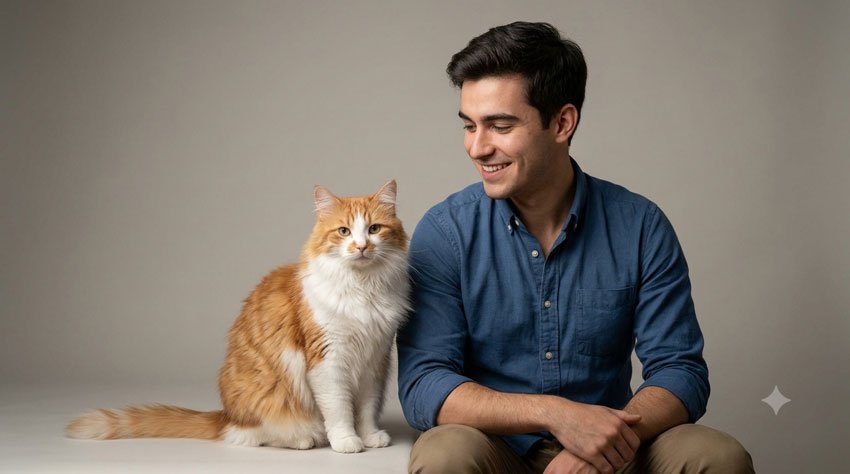
1. Professional Studio Pet and Owner Portrait
If you want a clean, professional photograph that could be printed and framed, start with a studio-style portrait.
Copy the Prompt
Create a realistic professional studio portrait using the uploaded photo of the owner and pet as the reference. Keep the person’s facial features and the pet’s appearance, fur color, markings and recognizable characteristics consistent with the reference photo. Place them together in a simple professional studio with a soft neutral background. Show the owner sitting comfortably beside the pet with natural, affectionate body language. Use soft professional portrait lighting, realistic skin and fur texture, natural expressions and subtle background blur. The final image should look like a professionally photographed family portrait rather than an artificial illustration.
Best For
- Framed portraits
- Profile pictures
- Family memories
- Pet photography
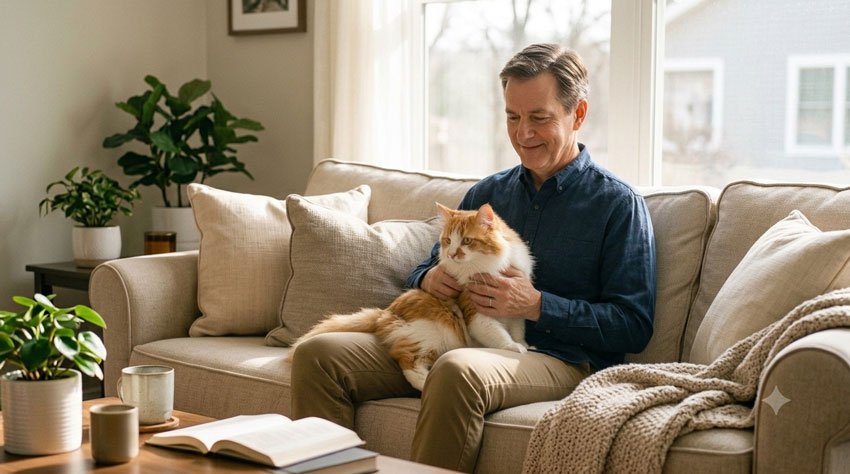
2. Cozy Dog and Owner Portrait at Home
A relaxed home setting can make the image feel much more personal and natural.
Copy the Prompt
Transform the uploaded photo into a warm and realistic lifestyle portrait of the owner spending time with their dog at home. Keep the owner’s facial features and the dog’s breed, fur color, markings and appearance consistent with the reference image. Place them together on a comfortable sofa in a bright, cozy living room. Show the owner gently holding or sitting beside the dog with a relaxed and genuine expression. Use natural window light, warm neutral colors, realistic textures and subtle depth of field. Make the image feel like a candid family photograph taken at home.
Best For
- Family memories
- Pet lovers
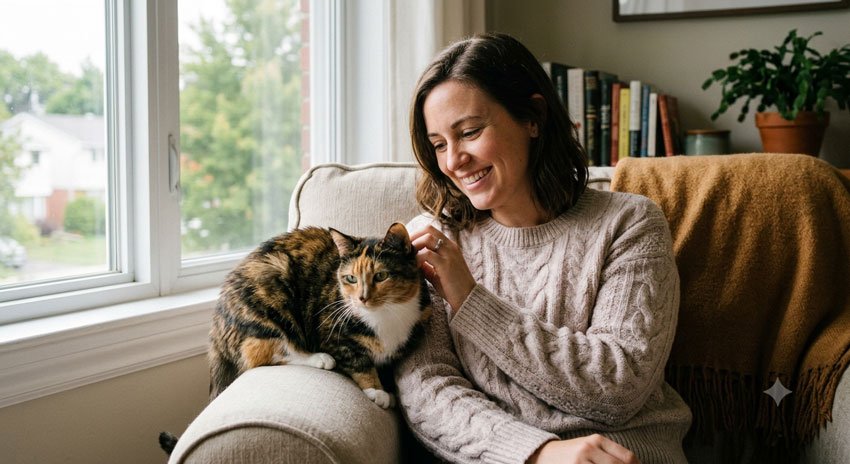
3. Cat and Owner Cozy Portrait
This prompt is designed for cat owners who want a softer and more intimate portrait.
Copy the Prompt
Create a realistic cozy portrait of the owner and their cat using the uploaded photo as the reference. Preserve the owner’s recognizable facial features and the cat’s original fur color, pattern, eye color and distinctive markings. Place them together near a bright window in a comfortable home. Show the cat sitting naturally beside the owner while the owner gently interacts with the cat. Use soft natural window lighting, realistic fur detail, natural skin texture and a warm peaceful atmosphere. Avoid exaggerated poses or cartoon-like features. Make the final image look like a genuine lifestyle photograph.
Best For
- Cat owners
- Social media
- Pet profiles
- Personal memories
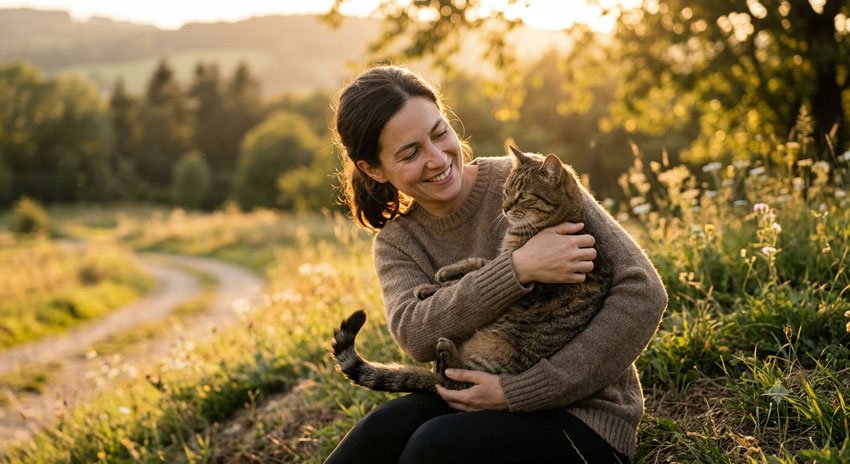
4. Golden Hour Pet and Owner Portrait
Golden-hour lighting can give a simple outdoor photo a warm and cinematic appearance.
Copy the Prompt
Turn the uploaded photo into a realistic golden-hour portrait of the owner and their pet outdoors. Keep the person’s facial features and the pet’s appearance, fur color and distinctive markings consistent with the reference image. Place them together in a peaceful natural setting during sunset. Show a genuine moment of connection between the owner and pet, with relaxed body language. Use warm golden sunlight, realistic shadows, soft background bokeh and natural skin and fur texture. Create a beautiful lifestyle photograph with a warm, emotional and timeless feeling.
Best For
- Outdoor portraits
- Instagram posts
- Pet photography
- Wall art
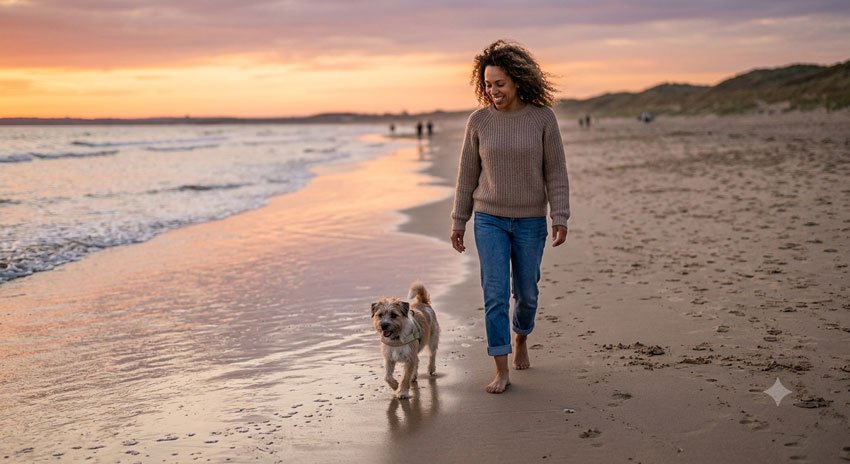
5. Beach Portrait With Your Pet
If your pet loves outdoor adventures, try turning your photo into a relaxed beach portrait.
Copy the Prompt
Create a realistic lifestyle photograph of the owner and pet walking together along a quiet beach. Use the uploaded image as the reference and preserve the person’s facial features and the pet’s recognizable appearance, fur color and markings. Show the owner walking naturally beside the pet near the water during golden hour. Add gentle waves, a warm sunset sky and soft reflections on the wet sand. Use realistic lighting, natural movement and authentic body language. The final image should look like a professional travel photograph rather than a fantasy scene.
Best For
- Travel memories
- Beach-loving pet owners
6. Pet and Owner in a Beautiful Autumn Park
An autumn setting works especially well when you want warm colors and a seasonal feeling.
Copy the Prompt
Create a realistic autumn portrait using the uploaded photo of the owner and pet as the reference. Keep the owner’s facial features and the pet’s breed, fur color and markings consistent with the original photo. Place them together in a beautiful autumn park surrounded by colorful fall trees and fallen leaves. Show the owner walking beside the pet in a relaxed and natural way. Use soft afternoon sunlight, warm autumn colors, realistic textures and shallow depth of field. The photograph should feel natural, peaceful and candid.
Best For
- Fall photography
- Seasonal social posts
- Family portraits
- Pet memories
7. Funny Matching Outfit Portrait
Want something playful rather than formal? Try coordinating the owner’s clothing with the pet.
Copy the Prompt
Create a fun and realistic portrait using the uploaded photo of the owner and pet as the reference. Keep the person’s face and the pet’s appearance, fur color and markings recognizable. Dress the owner in a casual outfit that subtly matches the pet’s natural colors, without changing the pet’s appearance. Place them together in a bright and simple setting. Give the owner a playful natural expression and show the pet in a relaxed pose. Use realistic photography, natural lighting and detailed fur texture. The result should be charming and humorous while still looking like a real photograph.
Best For
- Social media
- Funny pet posts
- Profile pictures
- Pet lovers
8. Vintage Family Portrait With Your Pet
For a nostalgic look, turn your pet photo into something that resembles a treasured family photograph.
Copy the Prompt
Transform the uploaded photo into a tasteful vintage family portrait featuring the owner and their pet. Keep the person’s facial characteristics and the pet’s original appearance recognizable. Place them together in a simple classic indoor setting with timeless clothing and natural body language. Use soft film-inspired lighting, subtle warm tones, gentle photographic grain and slightly muted colors. Keep the pet realistic and detailed rather than making it look illustrated. The finished image should resemble a treasured family photograph from a classic photo album.
Best For
- Family albums
- Printed portraits
- Nostalgic posts
- Pet memories
9. Christmas Pet and Owner Portrait
A holiday portrait can turn your pet into part of your Christmas memories.
Copy the Prompt
Create a realistic Christmas portrait of the owner and their pet using the uploaded photo as the reference. Preserve the owner’s facial features and the pet’s natural appearance, fur color and distinctive markings. Place them together in a cozy living room beside a beautifully decorated Christmas tree with warm lights and tasteful holiday decorations. Dress the owner in a comfortable festive outfit while keeping the pet natural and comfortable. Use warm indoor lighting, realistic shadows, detailed fur and a shallow depth of field. Make the scene feel like a genuine family Christmas photograph.
Best For
- Christmas cards
- Holiday social media posts
- Family memories
- Pet Christmas photos
10. Birthday Portrait With Your Pet
Your pet can be part of your birthday celebration too.
Copy the Prompt
Create a realistic birthday portrait using the uploaded photo of the owner and pet as the reference. Keep both the person and pet recognizable and preserve their natural facial and physical characteristics. Place them together in a cheerful birthday setting with tasteful balloons, flowers and a small birthday cake on a nearby table. Show the owner smiling naturally while sitting beside the pet. Use soft studio-style lighting, realistic colors and detailed fur texture. Keep the decorations elegant and avoid making the image look overly artificial. Create a joyful but natural family-style birthday photograph.
Best For
- Birthday posts
- Pet owners
- Social media
- Digital greeting images
11. Adventure Portrait With Your Pet
For people who enjoy hiking, camping or exploring with their pets, this prompt creates a more adventurous portrait.
Copy the Prompt
Create a realistic outdoor adventure photograph using the uploaded photo of the owner and pet as the reference. Keep the person’s facial features and the pet’s breed, fur color and markings consistent with the original image. Place them together on a scenic mountain trail surrounded by trees and distant mountains. Show the owner standing naturally beside the pet after a walk, with relaxed and happy expressions. Use natural morning light, realistic environmental details and professional outdoor photography. Keep the scene believable and avoid exaggerated fantasy elements.
Best For
- Hiking lovers
- Travel photography
- Outdoor social posts
- Adventure memories
12. Royal-Style Pet and Owner Portrait
If you want something more creative, give your pet and yourself a grand portrait setting.
Copy the Prompt
Create a playful but realistic royal-style portrait using the uploaded photo of the owner and pet as the reference. Keep the person’s recognizable facial features and preserve the pet’s natural appearance, fur color and markings. Place them in an elegant classic interior inspired by a grand portrait studio, with tasteful furniture and a refined background. Give the owner sophisticated formal clothing while keeping the pet’s appearance natural. Use dramatic but realistic portrait lighting, detailed textures and a classic editorial photography style. The result should feel luxurious and humorous without becoming a cartoon.
Best For
- Creative pet portraits
- Funny gifts
- Social media
- Wall art
13. Pet and Owner Coffee Shop Portrait
A casual café setting can create a modern lifestyle photograph that feels less like a formal portrait.
Copy the Prompt
Create a realistic lifestyle photograph of the owner spending time with their pet at a cozy pet-friendly coffee shop. Use the uploaded photo as the reference and preserve the owner’s facial features and the pet’s recognizable appearance. Show the owner sitting at a small café table while the pet sits comfortably beside them. Add a coffee cup, subtle café details and warm natural lighting. Keep the composition candid and relaxed rather than heavily posed. Use realistic skin and fur textures, natural colors and soft background blur.
Best For
- Lifestyle photography
- Pet-friendly lifestyle content
- Casual portraits
14. Peaceful Sunset Pet Portrait
A quiet sunset scene can work especially well when you want an emotional and meaningful image.
Copy the Prompt
Create a peaceful and realistic sunset portrait of the owner and pet using the uploaded photo as the reference. Keep the person’s recognizable facial characteristics and preserve the pet’s original appearance, fur color and distinctive markings. Place them together in a quiet natural landscape during sunset. Show the owner sitting beside the pet and gently looking toward them. Use warm backlighting, soft golden tones, realistic silhouettes and subtle depth of field. Keep the mood calm, affectionate and sincere. Avoid excessive visual effects and keep the photograph natural.
Best For
- Meaningful pet memories
- Pet owners
- Emotional photography
- Social media
15. Pet as Part of the Family Portrait
Sometimes the best pet portrait is simply a family photo where the pet is treated as part of the family.
Copy the Prompt
Create a realistic family-style portrait using the uploaded photo of the owner and pet as the reference. Keep the person’s facial characteristics and the pet’s appearance, fur color, markings and proportions consistent with the reference image. Place them together in a bright and comfortable home or outdoor garden setting. Show the owner naturally interacting with the pet as an important part of the family. Use relaxed body language, genuine expressions, natural lighting and realistic photography. The final image should feel warm, authentic and personal rather than staged.
Best For
- Family portraits
- Pet owners
- Printed photographs
- Memory albums
How to Get More Realistic Pet Images
One of the biggest challenges with AI-generated pet portraits is keeping the animal’s appearance consistent. A beautiful background doesn’t help much if your dog suddenly has a different coat color or your cat has completely different markings.
These simple instructions can help.
Keep the Pet’s Appearance Consistent
Add details such as:
- Breed
- Fur color
- Distinctive markings
- Eye color
- Approximate size
- Ear shape
- Coat length
For example:
Keep the dog’s original golden coat, floppy ears, white chest marking and facial features consistent with the reference photo.
Describe the Pet’s Position
Instead of simply asking for a portrait of the owner and pet, describe what they are doing.
For example:
The dog is sitting beside the owner with its head slightly turned toward the camera.
This gives the image model more specific direction.
Ask for Natural Fur
If the fur looks artificial, you can add:
Detailed but natural fur texture with individual hairs visible and realistic lighting across the coat.
Avoid adding too many competing instructions. Start with the basics and refine the image if necessary.
How to Keep the Owner and Pet Looking Consistent
If you are transforming an existing photo, tell the AI what should remain unchanged.
A useful instruction is:
Keep the owner’s facial features, hairstyle and overall appearance unchanged. Keep the pet’s breed, fur color, markings, face shape and recognizable characteristics unchanged. Modify only the environment, clothing and lighting.
This is especially useful when you already have a photo you like and only want to change the background or overall style.
If the generated result changes too many things, try making a smaller edit instead of asking for an entirely new image.
How to Create Better Pet and Owner AI Prompts
A useful pet portrait prompt doesn’t need to be complicated. Think about the image in a few simple parts:
Pet + Owner + Location + Interaction + Clothing + Lighting + Photography Style + Mood
For example:
Dog and owner + autumn park + walking together + casual clothing + golden-hour light + lifestyle photography + warm and peaceful mood.
1. Pet
Describe the animal and any important identifying characteristics.
2. Owner
Describe the person’s clothing or appearance only when it is relevant to the scene.
3. Location
Choose a specific environment such as a garden, beach, park, home or mountain trail.
4. Interaction
Describe what the owner and pet are doing together.
5. Lighting
Try natural window light, golden hour, soft morning light or warm evening light.
6. Photography Style
Use phrases such as natural lifestyle photography, professional portrait photography or documentary-style photography.
Pet Portrait Ideas for Instagram and Pinterest
Different platforms work well with different image compositions.
| Use | Suggested Ratio |
|---|---|
| Instagram Feed | 4:5 |
| Instagram Story | 9:16 |
| Pinterest Pin | 2:3 |
| Facebook Post | 1:1 or 4:5 |
| Website Featured Image | 16:9 |
| Printed Portrait | 4:5 or 5:7 |
If you plan to add text to a social media image, ask the AI to leave some clean space in the composition.
For example:
Leave clean, uncluttered space on the upper portion of the image for a short caption. Do not generate text in the image.
What If Your Pet Looks Different in the AI Image?
This can happen, especially when the reference photo is unclear or the requested scene requires a major change in pose or environment.
Try giving the AI more specific information about your pet.
For example:
Keep the pet’s original appearance from the uploaded reference. Preserve the same fur color, coat pattern, eye color, face shape, ear shape and distinctive markings. Do not change the breed or physical characteristics.
You can also try using a clearer reference photograph. A well-lit image where the pet’s face and coat are visible may provide better information than a dark or heavily filtered photograph.
Remember that AI-generated images can still contain inaccuracies. Always check the final image carefully, especially when the animal’s face, paws, eyes or body proportions are important.
Can You Use These Prompts for Different Pets?
Yes. The general prompt structure can be adapted to many companion animals.
Dogs
Include details such as breed, coat color, markings, ear shape and size.
Cats
Describe fur pattern, eye color, coat length and distinctive facial markings.
Rabbits
Include fur color, ear shape, size and any distinctive markings.
Other Companion Animals
You can adapt the prompts for other pets by describing the animal’s appearance and keeping the scene appropriate and comfortable for that animal.
Final Thoughts
Your pet is part of your everyday life, so a great pet portrait doesn’t have to look like a magazine cover. Often, the most meaningful images are the ones that capture the relationship between you and your animal naturally.
Start with a clear reference photo and one of the prompts above. Then experiment with different locations, seasons, lighting and photography styles.
If the first result isn’t quite right, don’t throw away the entire prompt. Ask the AI to change one thing at a time while keeping the pet and owner unchanged.
Whether you want a professional studio portrait, a funny social media image, a holiday photo or a peaceful outdoor memory, these prompts give you a starting point for creating something that feels personal to you and your pet.
Most importantly, keep your pet’s real personality at the center of the image. The goal isn’t simply to create a beautiful picture—it is to create a picture that still feels like your pet.
Frequently Asked Questions
Q1. Can I use these AI prompts with my own pet photo?
Yes. If the AI image tool supports image editing or reference images, you can upload a photo of your pet and adapt these prompts to create a new scene.
Q2. Can I use these prompts for both dogs and cats?
Yes. Most of the prompts can be adapted for dogs, cats and other companion animals. Replace the pet-specific details with the characteristics of your own animal.
Q3. How can I make my pet look more like the original photo?
Describe important characteristics such as breed, fur color, markings, eye color and distinctive features. You can also explicitly ask the AI to preserve those characteristics from the reference image.
Q4. Why does AI sometimes change my pet’s face?
AI image models may interpret a new pose, lighting condition or environment differently from the original photograph. A clear reference image and specific instructions about which features should remain unchanged can help.
Q5. Can I create a professional pet portrait with AI?
Yes. You can ask for professional studio lighting, realistic photography, controlled backgrounds and natural poses. The final result will depend on the image model and reference photo.
Q6. Can I use these prompts for Instagram?
Yes. A 4:5 portrait composition works well for many Instagram feed images, while 9:16 can be used for vertical Stories and similar full-screen content.
Q7. Can I use these prompts with other AI image generators?
Yes. The concepts can generally be adapted to different AI image tools, although each model may respond differently to the wording of a prompt.
Q8. Can I create a pet portrait without uploading a photo?
Yes. You can describe the pet and owner in text and ask the AI to create a fictional scene. However, if you want the image to resemble a real pet, an appropriate reference image can make the result more personal.
Last updated: September 28, 2026